
📦 Git Objects - Blobs, Trees & Commits
🧱 The Building Blocks of Git
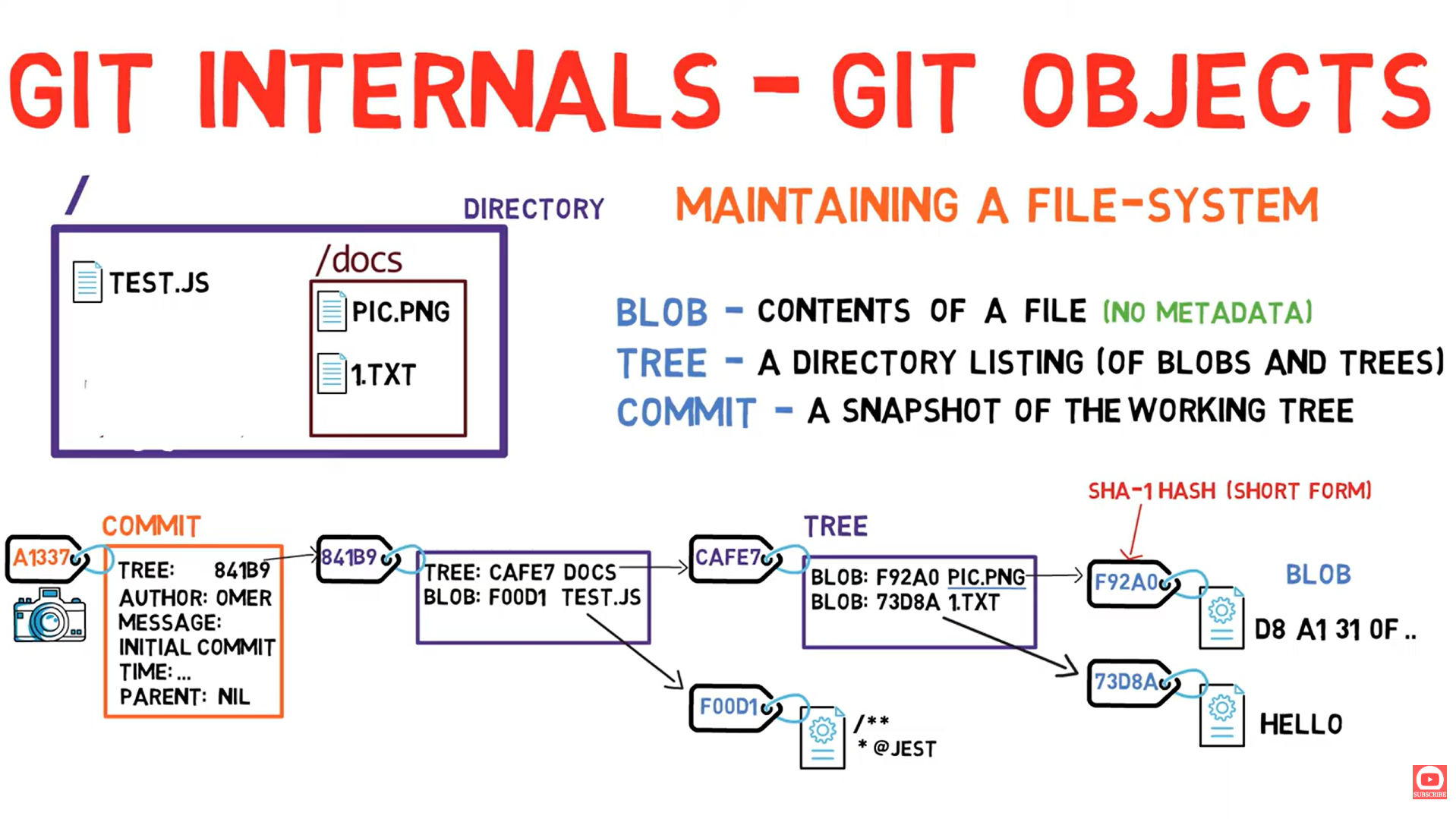
Everything in Git is built from three simple objects: Blobs, Trees, and Commits
📺 Video Reference
| Resource | Link |
|---|---|
| 🎬 Video | Git Objects |
| 📄 Transcript | 02-git-objects.txt |
🧠 Mental Model: Git as a File System
"Forget about code repositories for a moment. Think of Git as a system for maintaining snapshots of a file system."
📦 Object 1: Blob (Binary Large Object)
Definition
Blob vs File: Key Differences
| Aspect | File | Blob |
|---|---|---|
| Contains | Contents + metadata | Contents only |
| Has name? | Yes (filename) | No |
| Has date? | Yes (created, modified) | No |
| Has permissions? | Yes | No |
| Identified by | Path + name | SHA-1 hash |
Visual Representation
┌─────────────────────────────────────────┐
│                  FILE                    │
│  ┌────────────────────────────────────┐ │
│  │ Name: hello.txt                    │ │
│  │ Created: 2024-01-26                │ │
│  │ Modified: 2024-01-26               │ │
│  │ Permissions: 644                   │ │
│  │ ──────────────────────────────     │ │
│  │ Contents: "Hello, World!"          │ │
│  └────────────────────────────────────┘ │
└─────────────────────────────────────────┘

┌─────────────────────────────────────────┐
│                  BLOB                    │
│  ┌────────────────────────────────────┐ │
│  │ Contents: "Hello, World!"          │ │
│  └────────────────────────────────────┘ │
│  SHA-1: aaf4c61ddcc5e8a2...            │
└─────────────────────────────────────────┘
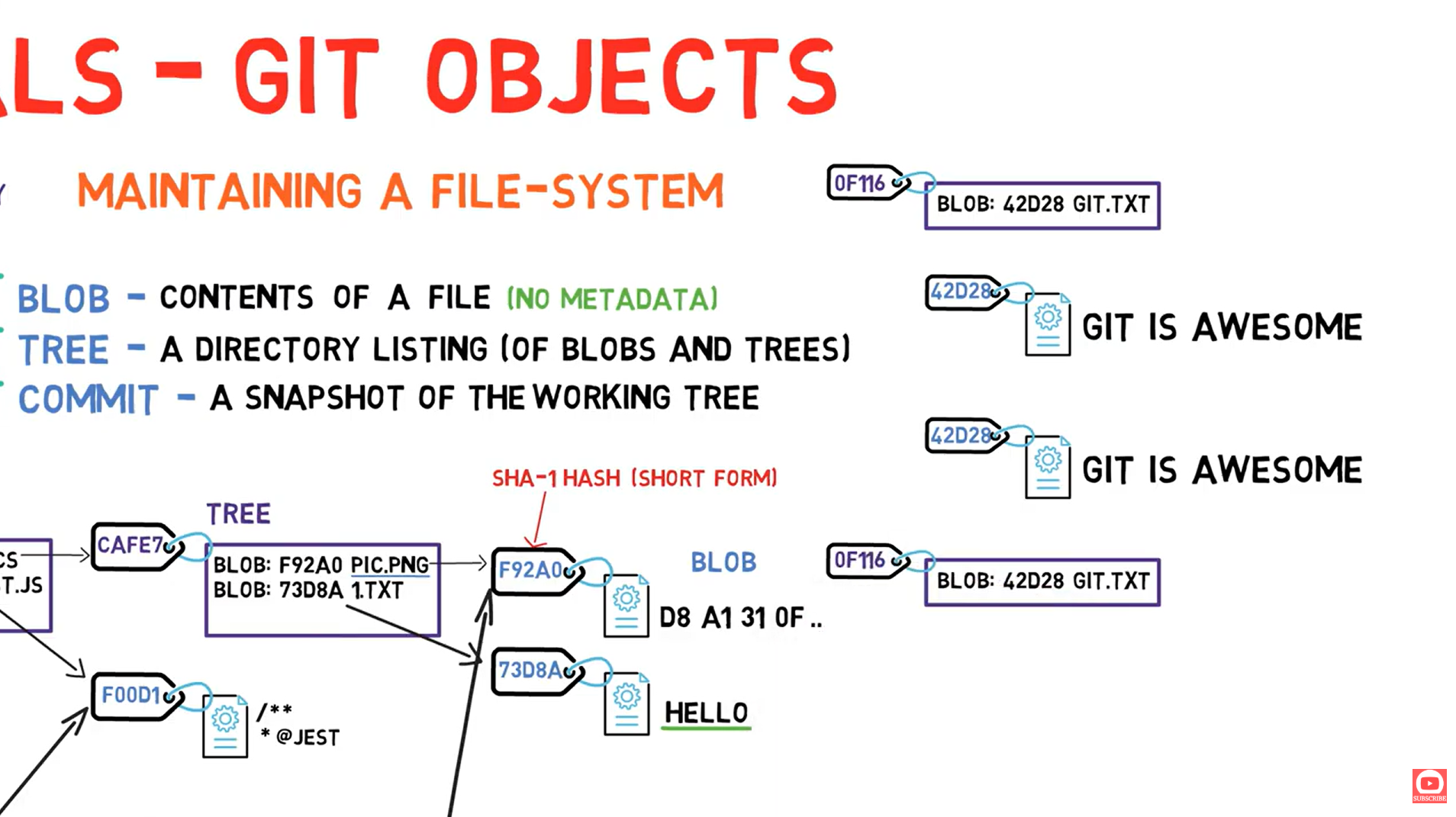
SHA-1 Hash Explained
If you and I both create a blob with "Hello World", we'll get the exact same SHA-1 hash. This is how Git deduplicates data!
SHA-1 Format
SHA-1 hash: 20 bytes = 40 hexadecimal characters

Example: aaf4c61ddcc5e8a2dabede0f3b482cd9aea9434d
         ↑                                      ↑
         First character                   Last character

Git often shows short version: aaf4c61 (first 7 chars)
🌳 Object 2: Tree
Definition
Tree Structure
Tree: caf7e8a...
├── 100644 blob f92a0b1... peak.png
├── 100644 blob 73d8ab2... 1.txt
└── 040000 tree 24601ac... subdirectory
Visual Representation
File Modes in Trees
| Mode | Type | Description |
|---|---|---|
100644 | blob | Regular file |
100755 | blob | Executable file |
120000 | blob | Symbolic link |
040000 | tree | Directory |
160000 | commit | Submodule |
Important: Names Are in Trees, Not Blobs!
📸 Object 3: Commit
Definition
What a Commit Contains
commit a1337e5...
├── tree: caf7e8a...        ← Points to root tree (snapshot)
├── parent: 8b2f9c1...      ← Previous commit (optional)
├── author: John <j@x.com>  ← Who wrote the code
├── committer: Jane <j@x.com> ← Who committed
├── date: Mon Jan 26 2026   ← When committed
└── message: "Initial commit" ← Commit message
Visual Representation
Important: Commits Store FULL Snapshots!
- Changed files → New blob created
- Unchanged files → Just reference existing blob (no duplication!)
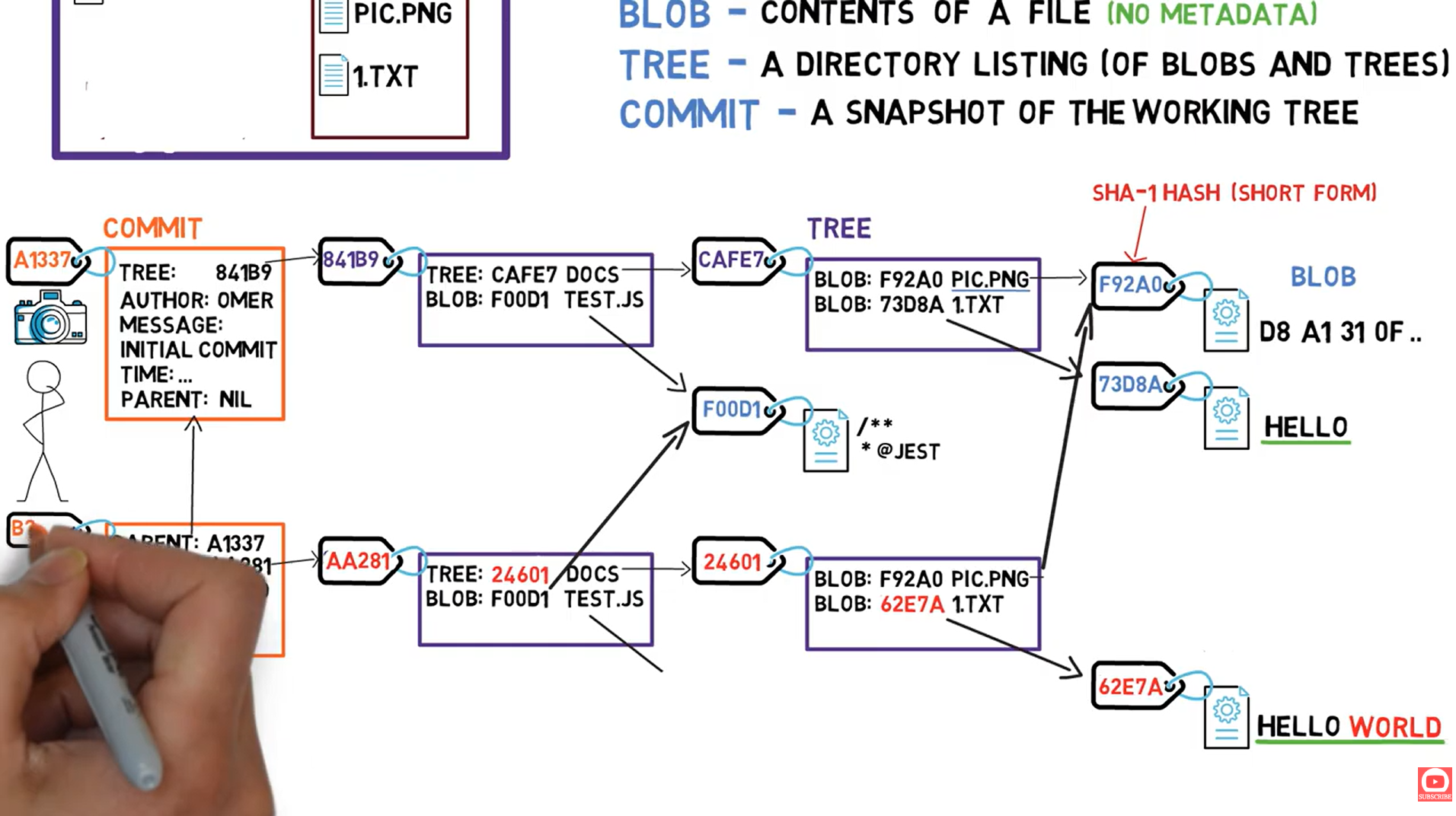
🔄 How Changes Propagate
When you change a file, watch how hashes ripple upward:
Change Propagation Rules
| What Changed | What Gets New Hash |
|---|---|
| File contents | Blob + all parent Trees + Commit |
| Directory structure | Tree + all parent Trees + Commit |
| Only commit message | Just the Commit |
🧪 Hands-On Lab: Exploring Objects
Setup
# Create a test repository
mkdir git-objects-lab && cd git-objects-lab
git init
Create and Inspect a Blob
# Create a file
echo "Hello, Git Internals!" > hello.txt

# Stage it (this creates the blob)
git add hello.txt

# Find the blob
find .git/objects -type f
# Output: .git/objects/5e/1c309dae7f45e0f39b1bf3ac3cd9db12e7d689

# Inspect the blob
git cat-file -t 5e1c309dae7f45e0f39b1bf3ac3cd9db12e7d689
# Output: blob

git cat-file -p 5e1c309dae7f45e0f39b1bf3ac3cd9db12e7d689
# Output: Hello, Git Internals!
Create and Inspect a Tree
# Commit to create a tree
git commit -m "Initial commit"

# Find the tree from the commit
git cat-file -p HEAD
# Output:
# tree 8b137891791fe96927ad78e64b0aad7bded08bdc
# author ...
# committer ...
# Initial commit

# Inspect the tree
git cat-file -p 8b137891791fe96927ad78e64b0aad7bded08bdc
# Output: 100644 blob 5e1c309... hello.txt
Visualize the Object Graph
# See all objects
find .git/objects -type f | while read f; do
    hash=$(echo $f | sed 's:.git/objects/::' | tr -d '/')
    type=$(git cat-file -t $hash)
    echo "$hash ($type)"
done
🎯 Quick Reference: Git Object Commands
| Command | Purpose | Example |
|---|---|---|
git cat-file -t <sha> | Show object type | git cat-file -t abc123 |
git cat-file -p <sha> | Pretty-print object | git cat-file -p abc123 |
git cat-file -s <sha> | Show object size | git cat-file -s abc123 |
git hash-object <file> | Compute hash | git hash-object hello.txt |
git hash-object -w <file> | Compute hash & write blob | git hash-object -w hello.txt |
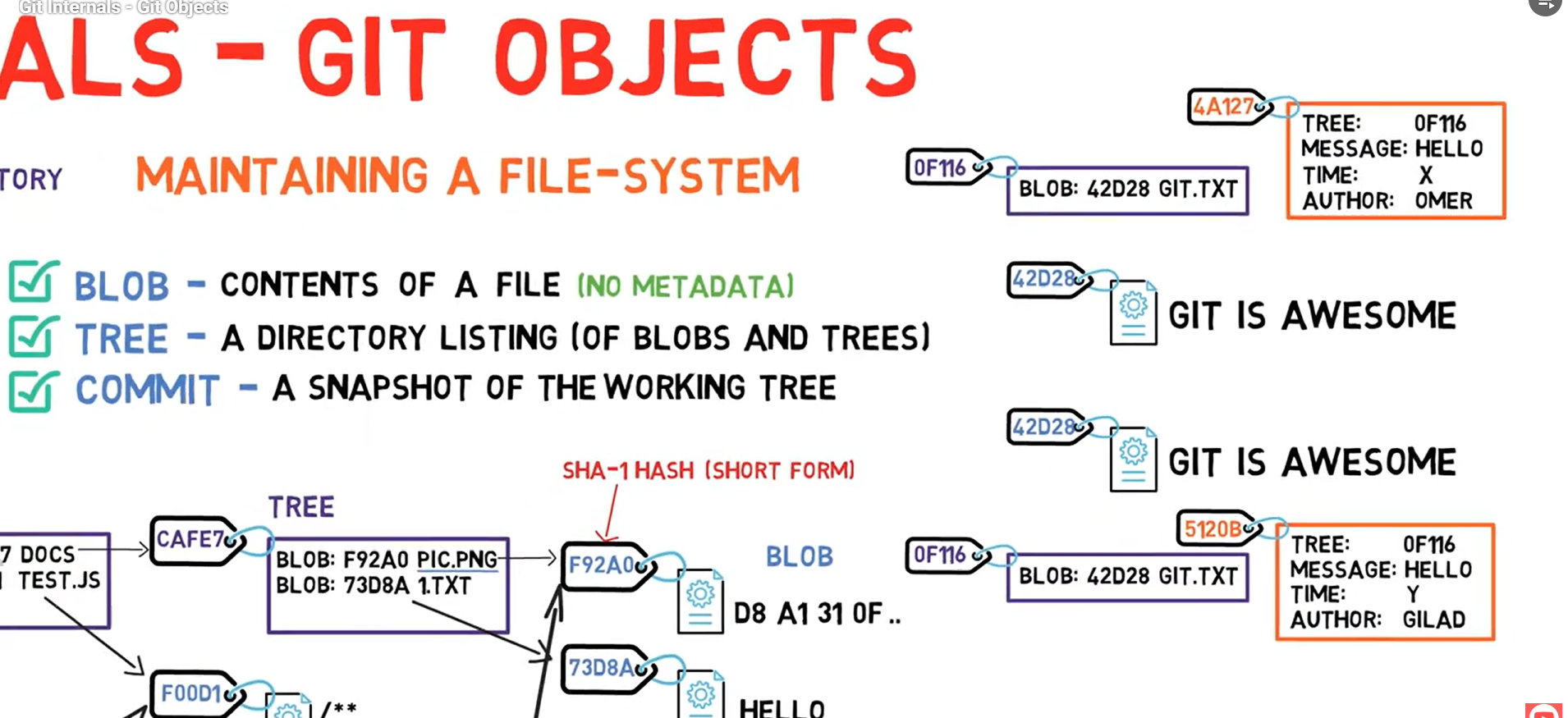
🧠 Quiz: Test Your Understanding
1. If I create a blob with "Git is awesome" and you create the same on your computer, will we have the same hash?
✅ YES! Same content always produces the same SHA-1 hash. This is content-addressed storage.
2. If we both create a tree pointing to that blob with the same name, same hash?
✅ YES! Trees are also identified by their content (which includes the blobs they point to).
3. If we both create commits of that tree with message "hello", same hash?
❌ NO! Commits include metadata like author, timestamp, and committer - these will differ!
4. Does Git store diffs between commits?
❌ NO! Git stores full snapshots. But it's efficient because unchanged blobs are reused (not duplicated).
📊 Object Relationship Summary
� What's Next?
🌿 Next: Branches (Lesson 03)
Now that you understand objects, let's learn how branches work. Spoiler: they're much simpler than you think - just a file containing a commit SHA!
📝 Summary
| Object | What It Is | Identified By | Contains |
|---|---|---|---|
| Blob | File contents | SHA-1 of content | Raw bytes |
| Tree | Directory | SHA-1 of listing | Blobs + Trees |
| Commit | Snapshot | SHA-1 of metadata + tree | Tree + parent + metadata |