
Identity Fundamentals
Source: Azure Master Class v3 - Part 2 - Identity by John Savill
Timestamps:00:00:00-00:22:00
Why Identity is the New Security Perimeter
In the cloud world, identity is the new security perimeter. We can't lock things away anymore with just a network firewall. Instead, identity becomes the place where we:
- Assign permissions to various resources
- Control access regardless of location
- Authenticate users, applications, and devices
Key Principle
It's critical to understand, architect, and operate your identity solution correctly—and that includes educating your users about different types of attacks.
The Need for Identities
📺 Video Reference: 00:01:56
Why Different Identities Need Different Access
Not everyone gets the same access. The goal is to always give whatever identity we're dealing with the minimum possible set of permissions—just enough for it to perform the required function.
| Principle | Description |
|---|---|
| Just Enough | Only the permissions needed for the task |
| Just in Time | Permissions granted only when needed |
| Least Privilege | Minimum rights to perform a function |
The Risk of Over-Permissioning
If I have more permissions than required:
- Accidental risk: I do something that has massive unintended impact
- Deliberate risk: A bad actor gets the credential and can do bad things
Real-World Impact
This is why Microsoft is rolling out mandatory MFA—organizations that used user accounts for automations are now stuck because automations can't comply with MFA requirements.
Roles and Role Assignments
📺 Video Reference: 00:03:07
Rather than granting every permission individually (there could be hundreds), we group permissions into roles:
A role assignment consists of:
- Role - A set of permissions or actions
- Identity - Who gets the role (user, group, service principal)
- Scope - Where the role applies (tenant, subscription, resource)
Types of Identities
| Type | Description | Use Case |
|---|---|---|
| Human | Actual users | Interactive access |
| Application | Service principals | API access, background jobs |
| Automation | Scripts, CI/CD | Deployments, maintenance |
| Device | Computers, phones | Device-based access |
Why Not Share Identities?
📺 Video Reference: 00:05:39
There are multiple challenges with sharing identities:
- Different needs - Different people/automations need different permissions
- Permission creep - Shared identity accumulates ALL required permissions
- Audit impossibility - Can't tell who actually did what
- Over-permissioning - Sum of all permissions exceeds any single need
Never Share Accounts
Each actor (human, automation, application) should be uniquely identifiable. Shared accounts break auditing and security principles.
The Identity Provider (IDP)
📺 Video Reference: 00:07:03
A central store for identities that:
- Maintains the list of security principals
- Enables authentication (proving identity)
- Issues tokens for resource access
Authentication vs Authorization
| Concept | Symbol | Description |
|---|---|---|
| Authentication (AuthN) | 🔐 | Prove I am who I say I am |
| Authorization (AuthZ) | ✅ | What can this identity do |
Decentralized Identity (Preview)
📺 Video Reference: 00:11:01
A newer concept where the user is in the center of the picture:
Traditional vs Decentralized
| Aspect | Traditional IDP | Decentralized ID |
|---|---|---|
| Who's in center | Identity Provider | User |
| Who owns identity | IDP can revoke | User owns completely |
| Information sharing | IDP decides | User controls |
| Portability | Locked to provider | Portable wallet |
How Decentralized ID Works
- User has a digital wallet (like Microsoft Authenticator)
- Issuers (government, employers) create verifiable credentials
- User stores credentials in their wallet
- Verifiers request specific claims
- User consents and shares only what's needed
Selective Disclosure
You can prove you're over 21 without sharing your actual birth date—sharing only the fact, not the data.
Learn More: Microsoft Entra Verified ID
Microsoft Entra ID
📺 Video Reference: 00:18:58
Entra ID (formerly Azure AD) is Microsoft's enterprise identity provider.
Why the Rename?
The old "Azure AD" name was terrible because:
- It suggested Active Directory running in the cloud
- It's a completely different type of directory service
- "Entra" = "Entrance" to your services
What Requires Entra ID?
All Microsoft clouds require an Entra tenant:
| Service | Entra Integration |
|---|---|
| Azure Subscriptions | ✅ Trust tenant for RBAC |
| Microsoft 365 | ✅ Users, groups, policies |
| Dynamics 365 | ✅ Identity provider |
| Third-party SaaS | ✅ Federation support |
Entra ID vs Active Directory Domain Services
| Feature | AD DS (On-Prem) | Entra ID (Cloud) |
|---|---|---|
| Purpose | Closed network identity | Cloud/SaaS identity |
| Protocols | Kerberos, NTLM, LDAP | OAuth 2.0, OIDC, SAML |
| Ports | Many (wide range) | HTTPS only (443) |
| Structure | Organizational Units (OU) | Flat (no hierarchy) |
| Management | Group Policy | Conditional Access, Intune |
| Query | LDAP | Microsoft Graph API |
Common Misconception
Entra ID is NOT Active Directory in the cloud. They are completely different systems that happen to both provide identity services.
Entra ID Licensing
📺 Video Reference: 00:27:55
| License | Key Features | Pricing |
|---|---|---|
| Free | Basic user/group management, SSO | Included |
| P1 | Conditional Access, MFA, dynamic groups | Per user/month |
| P2 | Identity Protection, PIM, access reviews | Per user/month |
| Entra Suite | All P2 + Private Access, Verified ID, full governance | Per user/month (requires P1) |
Flexible Licensing
Licenses are per user per month—you don't have to license every user the same. Give P1 to standard users, P2 to admins, Suite to those needing advanced features.
Your Entra Tenant
📺 Video Reference: 00:30:00
Default Naming
When you create a tenant, it gets a default name:
yourcompany.onmicrosoft.comCustom Domain Names
You'll want to add your actual domain:
- Go to Entra Admin Center → Settings → Domain names
- Click Add custom domain
- Prove ownership via DNS TXT record
- Set as primary domain
Before: john@contoso.onmicrosoft.com
After:  john@contoso.com
If You Have M365...
📺 Video Reference: 00:34:54
You already have Entra! There's no such thing as a separate "M365 directory service"—it's all Entra ID under the hood.
The M365 Admin Center's user management is just hooking into Microsoft Graph and your Entra tenant.
Tenant Types
Entra ID has evolved to support different identity scenarios through tenant configurations:
Workforce Tenant (Default)
This is the standard tenant you get when signing up for Azure or M365. It's designed for:
| Purpose | Examples |
|---|---|
| Your employees | Internal staff accessing corporate resources |
| B2B collaboration | Partners, vendors as guest users in YOUR tenant |
| Hybrid identity | Sync with on-premises Active Directory |
A workforce tenant is where:
- Your internal users live (employees, contractors)
- You configure Conditional Access for corporate apps
- Guest users are invited for collaboration (B2B)
- Licenses are assigned (M365, P1, P2)
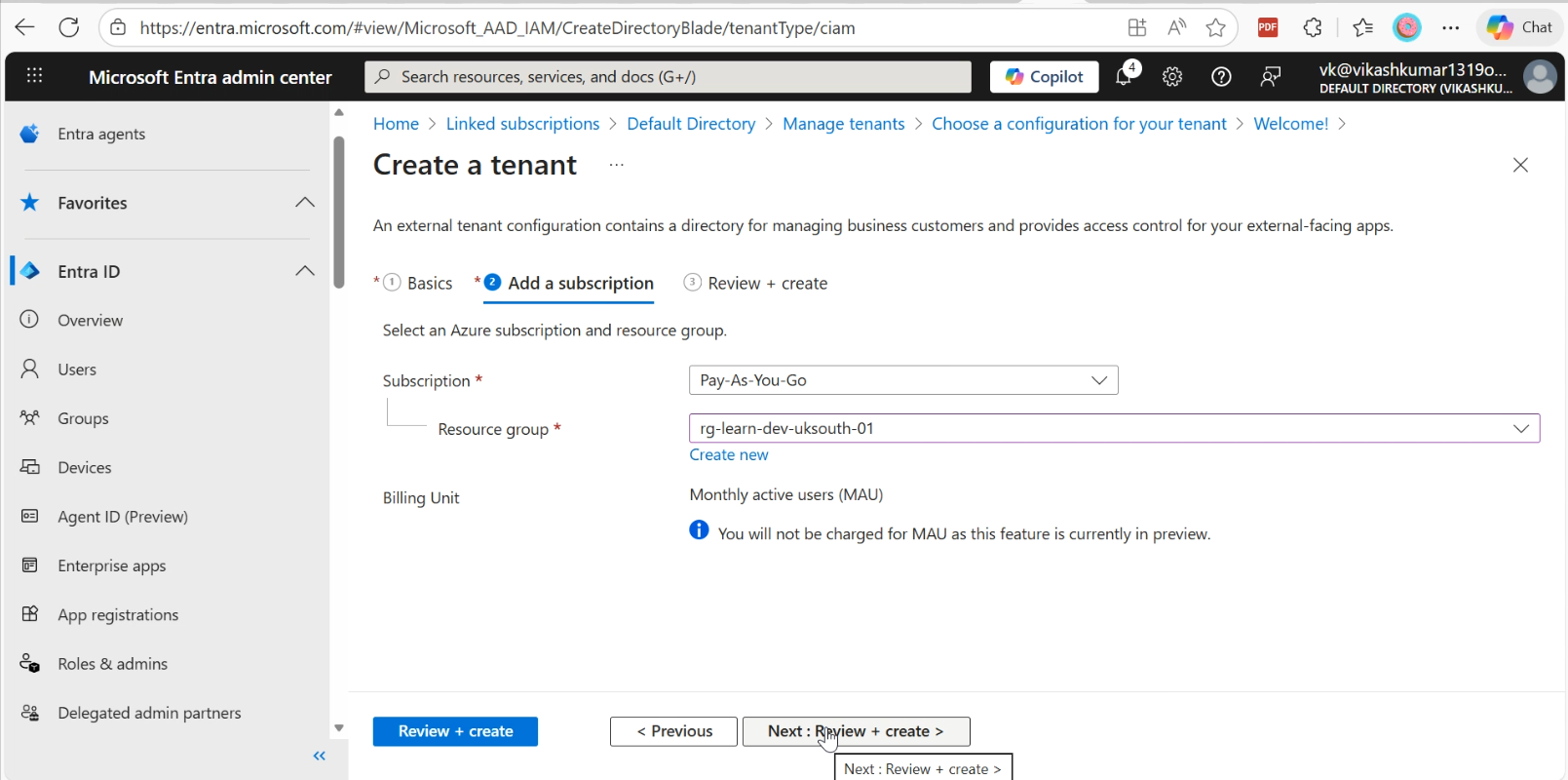
External Tenant (CIAM)
A separate tenant type optimized for customer-facing applications:
| Aspect | Workforce Tenant | External Tenant |
|---|---|---|
| Who's in it | Employees, B2B guests | Customers, consumers |
| Authentication | Corporate credentials | Social logins, email OTP |
| Scale | Thousands | Millions |
| Branding | Company portal | Fully customizable per app |
| Cost model | Per user/month | MAU (Monthly Active Users) |
When to Use External Tenant
Building a customer portal? Mobile app for consumers? Public-facing service? → External Tenant
Managing your workforce? Partner collaboration? Internal apps? → Workforce Tenant
Managing Multiple Tenants
You can create additional tenants, but should you?
When Multiple Tenants Make Sense
| Scenario | Recommendation |
|---|---|
| Development/sandbox | ✅ Separate tenant for testing |
| Merger & acquisition | ⏳ Consolidate when feasible |
| Regulatory (data residency) | ✅ May require geographic separation |
| Customer-facing apps | ✅ Use External tenant |
| >1 million users | ✅ Consider regional split |
| "Just because" | ❌ Avoid unnecessary complexity |
Multi-Tenant Complexity
Every additional tenant means:
- Separate licensing
- Separate admin accounts
- Separate policies to maintain
- Cross-tenant access to configure
- User migration challenges
Single Tenant First
Microsoft recommends a single tenant for organizations under 1 million users unless you have specific regulatory, administrative, or isolation requirements.
Cross-Tenant Collaboration
When you DO have multiple tenants, use B2B collaboration and Cross-Tenant Access Settings:
- Trust MFA from partner tenants (avoid double prompts)
- Trust device compliance across organizations
- Control which users can collaborate outbound/inbound
Quick Reference
Key Concepts
| Term | Definition |
|---|---|
| IDP | Identity Provider - central store for identities |
| Security Principal | Entity that can be authenticated |
| Role | Collection of permissions |
| Scope | Where permissions apply |
| Tenant | Your organization's Entra instance |
Important URLs
| Resource | URL |
|---|---|
| Entra Admin Center | entra.microsoft.com |
| Azure Portal | portal.azure.com |
| M365 Admin Center | admin.microsoft.com |
| My Account | myaccount.microsoft.com |