
Object Replication
Scott Duffy Lecture 14 AZ-104Overview
Object replication enables asynchronous copying of blobs from a source storage account to a destination storage account. It is designed for scenarios where data created in regional or departmental storage accounts needs to be consolidated into a single central repository -- a pattern commonly called a roll-up. Replication operates across subscriptions, across regions, and even across tenants, making it suitable for distributed organizations that need centralized data access for analytics, backup, or compliance.
Key Insight
Object replication is not real-time. It is asynchronous with propagation delays ranging from minutes to hours depending on data volume. If you need instant consistency across regions, this is not the right mechanism. It is designed for eventual consolidation, not synchronous mirroring.
What Is Object Replication?
Object replication allows you to define rules that automatically copy blobs from a source container in one storage account to a destination container in another storage account. The replication happens asynchronously in the background after blobs are created or modified.
Key characteristics:
- Asynchronous -- copies happen in the background, not in real-time
- One-way -- data flows from source to destination (not bidirectional)
- Container-level granularity -- rules are defined per container pair
- Cross-region capable -- source and destination can be in different Azure regions
- Cross-subscription capable -- accounts can live in different subscriptions
- Cross-tenant capable -- with explicit opt-in, accounts can span Azure AD tenants
Prerequisites
Both the source and destination storage accounts must have blob versioning and change feed enabled. When you create a replication rule through the Azure portal, these features are automatically enabled if they are not already -- but be aware that enabling them adds cost (versioning stores previous blob versions, and change feed logs all changes).
Replication Structure
The replication architecture consists of two storage accounts connected by replication rules:
| Component | Description |
|---|---|
| Source account | The primary storage account where data originates |
| Destination account | The receiving storage account that gets copies of blobs |
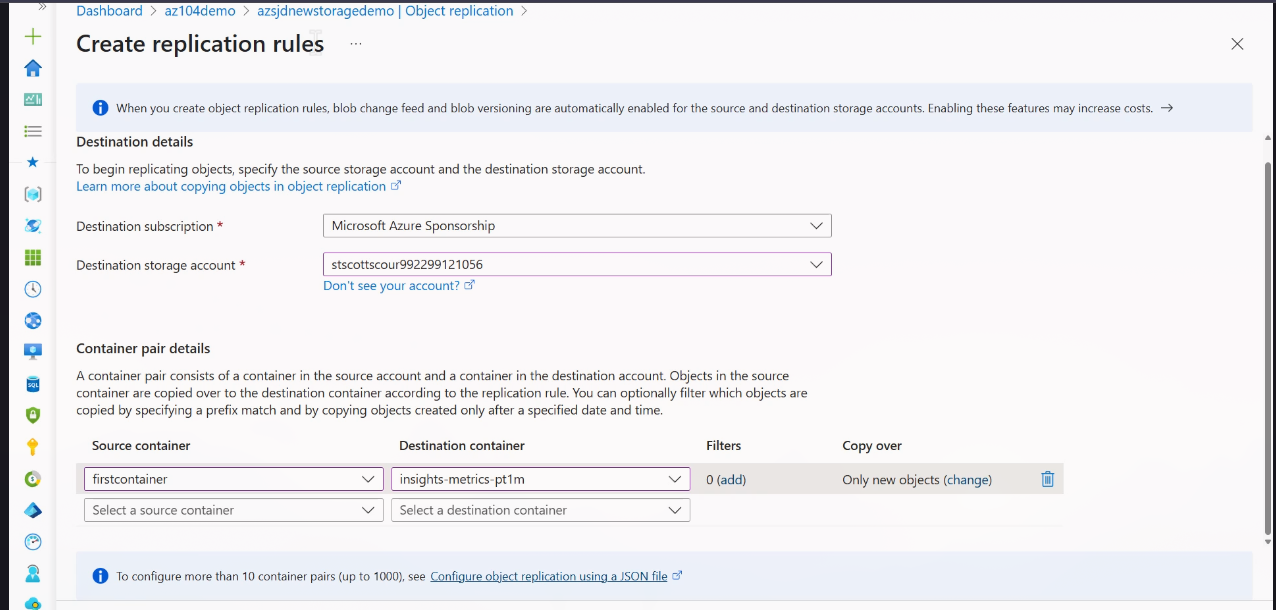
| Replication rule | Defines the source container, destination container, and copy strategy |
| Replication policy | A collection of one or more rules applied to an account pair |
direction: right

source: Source Storage Account {
  shape: rectangle
  style.fill: "#2563eb"
  style.font-color: "#fff"

  container1: source-container-1
  container2: source-container-2
}

dest: Destination Storage Account {
  shape: rectangle
  style.fill: "#16a34a"
  style.font-color: "#fff"

  container1: dest-container-1
  container2: dest-container-2
}

source.container1 -> dest.container1: "Rule 1\n(async copy)" {
  style.stroke: "#f59e0b"
}

source.container2 -> dest.container2: "Rule 2\n(async copy)" {
  style.stroke: "#f59e0b"
}
Replication Rules
Each replication rule defines a single source-to-destination container mapping and specifies what gets copied.
Basic Components
- Source storage account -- the account containing the original data
- Destination storage account -- the account receiving copied blobs
- Source container -- the specific container to replicate from
- Destination container -- the specific container to replicate to
- Copy strategy -- what blobs to include in the replication
Copy Options
| Strategy | Description |
|---|---|
| Copy new objects only (Default) | Only blobs created after the rule is set up are replicated |
| Copy everything | All existing blobs plus any future blobs are replicated |
| Custom filters | Filter by creation date, time, or specific prefix patterns |
Default Behavior
The default copy strategy is new objects only. If you need existing blobs to be replicated, you must explicitly select "Copy everything" or define custom filters with an appropriate minCreationTime value.
Copy Strategy Selection
Use Cases
Object replication serves several common enterprise patterns:
- Multi-region business consolidation -- Regional storage accounts in different geographies all replicate to a single central account for unified reporting and analytics
- Data roll-up -- Aggregate storage from worldwide office locations into one repository
- Backup pattern -- Multiple source accounts replicate to a single backup account in a designated recovery region
- Business intelligence -- Regional operational data flows to a central analytics storage account where data processing pipelines can access everything in one place
Roll-Up Pattern
The most common use case Scott Duffy highlights is the roll-up scenario: you have storage accounts specific to a region or business location, and you want all the data consolidated into one central account. Object replication automates this without requiring custom data pipelines.
Deployment Pattern
A typical multi-region deployment fans in from several regional accounts to a single central destination:
direction: right

region1: Regional Account 1\n(US East) {
  shape: rectangle
  style.fill: "#2563eb"
  style.font-color: "#fff"
}

region2: Regional Account 2\n(UK South) {
  shape: rectangle
  style.fill: "#7c3aed"
  style.font-color: "#fff"
}

region3: Regional Account 3\n(Japan East) {
  shape: rectangle
  style.fill: "#db2777"
  style.font-color: "#fff"
}

central: Central Analytics Account\n(US East) {
  shape: rectangle
  style.fill: "#16a34a"
  style.font-color: "#fff"
}

region1 -> central: "async replication" {
  style.stroke: "#f59e0b"
  style.stroke-dash: 3
}

region2 -> central: "async replication" {
  style.stroke: "#f59e0b"
  style.stroke-dash: 3
}

region3 -> central: "async replication" {
  style.stroke: "#f59e0b"
  style.stroke-dash: 3
}
The result is a single consolidated data repository where analytics, reporting, or compliance tooling can access all organizational data without querying multiple regional accounts.
Cross-Region and Cross-Subscription
Object replication supports scenarios where the source and destination accounts exist in entirely different environments:
- Cross-region -- Source in US East, destination in West Europe (or any combination)
- Cross-subscription -- Source and destination in different Azure subscriptions
- Cross-tenant -- Source and destination owned by different Azure AD tenants (requires explicit opt-in)
Cross-Tenant Requirement
To replicate across tenants, the destination storage account must have the cross-tenant replication flag enabled. This is an explicit action -- it is not enabled by default. Without it, cross-subscription and cross-tenant replication will be denied.
Object Replication vs GRS
It is important to distinguish object replication from Geo-Redundant Storage (GRS). They serve fundamentally different purposes:
| Feature | Object Replication | GRS |
|---|---|---|
| Control | You choose source and destination | Microsoft chooses paired region |
| Granularity | Container level | Entire storage account |
| Direction | One-way, configurable | Automatic to paired region |
| Use case | Data consolidation | Disaster recovery |
| Cost | Storage + cross-region bandwidth | Built into redundancy tier pricing |
| Failover | N/A -- not a DR mechanism | Account failover available |
Do Not Confuse
Object replication is not a disaster recovery solution. It does not provide failover capabilities. If you need automated failover to a secondary region, use GRS/RA-GRS/GZRS. Object replication is for data consolidation and distribution patterns.
Limits and Constraints
| Constraint | Limit |
|---|---|
| Maximum replication rules per storage account | 1,000 |
| Maximum destination accounts per source | 2 |
| Replication latency | Minutes to hours (depends on data volume) |
| Versioning requirement | Must be enabled on both accounts |
| Change feed requirement | Must be enabled on both accounts |
Replication Status Monitoring
You can check the replication status of individual blobs to verify that replication is progressing:
- Complete -- the blob has been successfully replicated to the destination
- Pending -- the blob has not yet been replicated
- Failed -- replication encountered an error
Cost Implications
Object replication incurs costs on multiple dimensions:
- Storage cost in the destination account (you are storing a second copy)
- Cross-region bandwidth charges if source and destination are in different regions
- Versioning overhead on both accounts (previous versions are retained)
- Change feed costs for logging blob changes on both accounts
Plan your budget accordingly when enabling replication across many containers or large data volumes.
Screenshots
Object Replication Rules Page
CLI Commands
# Enable versioning on source account
az storage account blob-service-properties update \
  --account-name sourceaccount \
  --resource-group myRG \
  --enable-versioning true

# Enable versioning on destination account
az storage account blob-service-properties update \
  --account-name destaccount \
  --resource-group myRG \
  --enable-versioning true

# Enable change feed on source account
az storage account blob-service-properties update \
  --account-name sourceaccount \
  --resource-group myRG \
  --enable-change-feed true

# Enable change feed on destination account
az storage account blob-service-properties update \
  --account-name destaccount \
  --resource-group myRG \
  --enable-change-feed true

# Create replication policy (using a JSON policy file)
az storage account or-policy create \
  --account-name destaccount \
  --resource-group myRG \
  --source-account sourceaccount \
  --policy @replication-policy.json

# List replication policies on an account
az storage account or-policy list \
  --account-name destaccount \
  --resource-group myRG

# Show replication policy details
az storage account or-policy show \
  --account-name destaccount \
  --resource-group myRG \
  --policy-id <policy-id>

# Delete a replication policy
az storage account or-policy delete \
  --account-name destaccount \
  --resource-group myRG \
--policy-id <policy-id># Enable versioning on source account
Update-AzStorageBlobServiceProperty `
-ResourceGroupName "myRG" `
-StorageAccountName "sourceaccount" `
-IsVersioningEnabled $true
# Enable versioning on destination account
Update-AzStorageBlobServiceProperty `
-ResourceGroupName "myRG" `
-StorageAccountName "destaccount" `
-IsVersioningEnabled $true
# Enable change feed on source account
Update-AzStorageBlobServiceProperty `
-ResourceGroupName "myRG" `
-StorageAccountName "sourceaccount" `
-EnableChangeFeed $true
# Enable change feed on destination account
Update-AzStorageBlobServiceProperty `
-ResourceGroupName "myRG" `
-StorageAccountName "destaccount" `
-EnableChangeFeed $true
# Create replication policy with a rule
$rule = New-AzStorageObjectReplicationPolicyRule `
-SourceContainer "source-container" `
-DestinationContainer "dest-container"
Set-AzStorageObjectReplicationPolicy `
-ResourceGroupName "myRG" `
-StorageAccountName "destaccount" `
-SourceAccount "sourceaccount" `
-Rule $rule
# List replication policies
Get-AzStorageObjectReplicationPolicy `
-ResourceGroupName "myRG" `
-StorageAccountName "destaccount"
# Remove a replication policy
Remove-AzStorageObjectReplicationPolicy `
-ResourceGroupName "myRG" `
-StorageAccountName "destaccount" `
-PolicyId "<policy-id>"Example Replication Policy JSON
{
  "rules": [
    {
      "sourceContainer": "source-container",
      "destinationContainer": "dest-container",
      "filters": {
        "minCreationTime": "2024-01-01T00:00:00Z"
      }
    }
  ]
}
Lab: Configure Object Replication Across Regions
Step 1 -- Create two storage accounts in different regions
# Set variables
RG="replication-lab-rg"
SOURCE_ACCOUNT="srcacct$RANDOM"
DEST_ACCOUNT="destacct$RANDOM"
SOURCE_REGION="eastus"
DEST_REGION="westeurope"

# Create resource group
az group create --name $RG --location $SOURCE_REGION

# Create source storage account
az storage account create \
  --name $SOURCE_ACCOUNT \
  --resource-group $RG \
  --location $SOURCE_REGION \
  --sku Standard_LRS \
  --kind StorageV2

# Create destination storage account
az storage account create \
  --name $DEST_ACCOUNT \
  --resource-group $RG \
  --location $DEST_REGION \
  --sku Standard_LRS \
  --kind StorageV2

echo "Source account: $SOURCE_ACCOUNT ($SOURCE_REGION)"
echo "Destination account: $DEST_ACCOUNT ($DEST_REGION)"
Step 2 -- Enable versioning and change feed on both accounts
# Enable versioning on source
az storage account blob-service-properties update \
  --account-name $SOURCE_ACCOUNT \
  --resource-group $RG \
  --enable-versioning true

# Enable versioning on destination
az storage account blob-service-properties update \
  --account-name $DEST_ACCOUNT \
  --resource-group $RG \
  --enable-versioning true

# Enable change feed on source
az storage account blob-service-properties update \
  --account-name $SOURCE_ACCOUNT \
  --resource-group $RG \
  --enable-change-feed true

# Enable change feed on destination
az storage account blob-service-properties update \
  --account-name $DEST_ACCOUNT \
  --resource-group $RG \
  --enable-change-feed true

# Verify settings
echo "--- Source account settings ---"
az storage account blob-service-properties show \
  --account-name $SOURCE_ACCOUNT \
  --resource-group $RG \
  --query "{versioning: isVersioningEnabled, changeFeed: changeFeed.enabled}"

echo "--- Destination account settings ---"
az storage account blob-service-properties show \
  --account-name $DEST_ACCOUNT \
  --resource-group $RG \
  --query "{versioning: isVersioningEnabled, changeFeed: changeFeed.enabled}"
Step 3 -- Create a container in each account
# Create source container
az storage container create \
  --name source-data \
  --account-name $SOURCE_ACCOUNT \
  --auth-mode login

# Create destination container
az storage container create \
  --name dest-data \
  --account-name $DEST_ACCOUNT \
  --auth-mode login

echo "Containers created: source-data and dest-data"
Step 4 -- Set up an object replication rule (source to destination)
# Create the replication policy JSON file
cat > /tmp/replication-policy.json << 'EOF'
{
  "rules": [
    {
      "sourceContainer": "source-data",
      "destinationContainer": "dest-data"
    }
  ]
}
EOF

# Create the replication policy on the destination account
az storage account or-policy create \
  --account-name $DEST_ACCOUNT \
  --resource-group $RG \
  --source-account $SOURCE_ACCOUNT \
  --policy @/tmp/replication-policy.json

# List policies to confirm
az storage account or-policy list \
  --account-name $DEST_ACCOUNT \
  --resource-group $RG
Step 5 -- Upload files to the source container
# Create test files
for i in 1 2 3 4 5; do
  echo "Replication test file $i - $(date -u)" > /tmp/testfile-$i.txt
done

# Upload files to source container
for i in 1 2 3 4 5; do
  az storage blob upload \
    --account-name $SOURCE_ACCOUNT \
    --container-name source-data \
    --name testfile-$i.txt \
    --file /tmp/testfile-$i.txt \
    --auth-mode login
done

echo "Uploaded 5 test files to source-data container"
Step 6 -- Wait and verify files appear in the destination
# Wait for replication (may take several minutes)
echo "Waiting 5 minutes for replication to propagate..."
sleep 300

# List blobs in the destination container
echo "--- Destination container contents ---"
az storage blob list \
  --account-name $DEST_ACCOUNT \
  --container-name dest-data \
  --auth-mode login \
  --output table \
  --query "[].{Name:name, Size:properties.contentLength, Created:properties.creationTime}"
If the destination container is empty, wait a few more minutes and retry. Replication latency depends on data volume and cross-region distance.
Step 7 -- Check replication status on individual blobs
# Check replication status of a specific blob in the source
az storage blob show \
  --account-name $SOURCE_ACCOUNT \
  --container-name source-data \
  --name testfile-1.txt \
  --auth-mode login \
  --query "{name:name, replicationStatus:properties.copy.status, lastModified:properties.lastModified}"

# List all blobs with their replication metadata
az storage blob list \
  --account-name $SOURCE_ACCOUNT \
  --container-name source-data \
  --auth-mode login \
  --output table

# Clean up when done
az group delete --name $RG --yes --no-wait
echo "Cleanup initiated. Resource group $RG will be deleted."