Instructor: Now the AZ-104 exam requirements
mentions the topic of object replication.
If we go into the storage account, under Data Management,
you'll find an Object Replication menu item,
and we go into there.
So object replication allows you to have asynchronous copies
of a source storage account to a destination account.
So you can imagine a scenario
where you have storage accounts
that are specific to a region
or specific to a particular location of your business,
and you wanna have a roll up
where all the data from all of these storage accounts
get stored into one central account.
And so you can do this using object replication.
As it says, you can use,
if the storage account has been created
with cross-tenant enabled,
which is an action that you have to take to allow it,
then you can use the storage accounts across subscriptions,
or even the storage accounts may be in different regions.
So if you have storage accounts from all over the world
coming to a particular region for the roll up action.
So we have two tabs here, Your Accounts and Other Accounts.
Let's just take a look at this concept of replication rules.
It should be pretty straightforward.
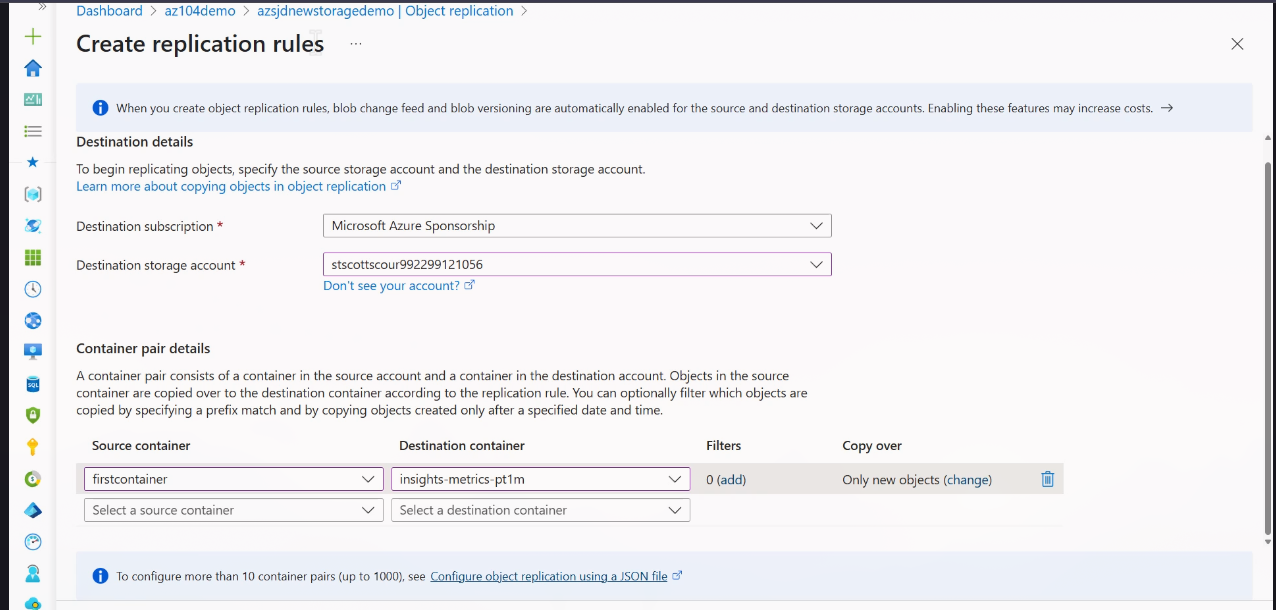
So we have a source, a storage account,
and a destination storage account.
So it's asking for a destination.
I'm gonna choose one of these other storage accounts
as the destination.
Then we can choose the source,
which could be the first container that we've created,
and we can choose the destination,
which could be one of these containers.
And as it says, copy over only new objects.
We can obviously modify this such that it copies everything
or that we put some custom rules on what gets copied,
date, time, et cetera.
So if we were to create this rule,
then any new files created on this storage account,
azsjdnewstoragedemo, in this container
will get copied to that other storage account
in that other container.
So that's a pretty straightforward way
to do object replication