
Azure Storage Services - The Mental Model
Source: Azure Master Class v3 - Part 5 - Storage by John Savill
Covers: 35:00 - 1:15:00
The Big Picture
Think of a Storage Account as a building with four departments, each specialized for a different job:
┌─────────────────────────────────────────────────────────────────────┐
│                     🏢 STORAGE ACCOUNT                              │
│                    (Your Storage Building)                          │
├─────────────────────────────────────────────────────────────────────┤
│                                                                     │
│   ┌─────────────┐  ┌─────────────┐  ┌─────────────┐  ┌───────────┐ │
│   │   📦 BLOB   │  │  📁 FILES   │  │  📬 QUEUE   │  │ 📊 TABLE  │ │
│   │             │  │             │  │             │  │           │ │
│   │  Any file   │  │ File shares │  │  Messages   │  │ Key-Value │ │
│   │  you want   │  │  (SMB/NFS)  │  │   passing   │  │   data    │ │
│   └─────────────┘  └─────────────┘  └─────────────┘  └───────────┘ │
│        ⭐              ⭐                 ⚠️             ⚠️         │
│     Primary         Primary           Legacy          Legacy       │
│                                                                     │
└─────────────────────────────────────────────────────────────────────┘
The 80/20 Rule
Blob and Files are what you'll use 99% of the time. Queue and Table exist but Microsoft recommends Service Bus and Cosmos DB instead.
Part 1: Blob Storage - The Foundation
Blob = Binary Large OBject. It stores ANY file - images, videos, backups, logs, anything.
The Container Model
Storage Account
    └── Container (like a folder)
            └── Blobs (your files)
            └── Blobs
            └── Blobs
    └── Container
            └── Blobs
Mental Model: Container = Bucket. You create buckets to organize your blobs.
🖥️ Portal Deep Dive: Create Storage Account Options
When you create a storage account in Azure Portal, you'll see several dropdowns that determine what kind of storage you get. Understanding these options is critical!
The Portal Creation Flow
┌─────────────────────────────────────────────────────────────────────┐
│                   CREATE STORAGE ACCOUNT                            │
├─────────────────────────────────────────────────────────────────────┤
│                                                                     │
│  Storage account name *    [sajttdevuksouth01          ]            │
│                                                                     │
│  Region *                  [(UK) UK South              ▼]           │
│                            Deploy to an Azure Extended Zone          │
│                                                                     │
│  Preferred storage type    [Azure Blob Storage or...   ▼]           │
│                            ℹ️ This helps us provide relevant         │
│                               guidance. It doesn't restrict         │
│                               your storage to this resource type.   │
│                                                                     │
│  Primary workload          [Other                      ▼]           │
│                                                                     │
│  Performance *             [Standard / Premium         ]            │
│                                                                     │
│  Premium account type *    [Block blobs / Page blobs / ▼]           │
│                            File shares                              │
│                                                                     │
│  Redundancy *              [LRS / ZRS / GRS / GZRS     ▼]           │
│                                                                     │
└─────────────────────────────────────────────────────────────────────┘
1️⃣ Preferred Storage Type (Dropdown)
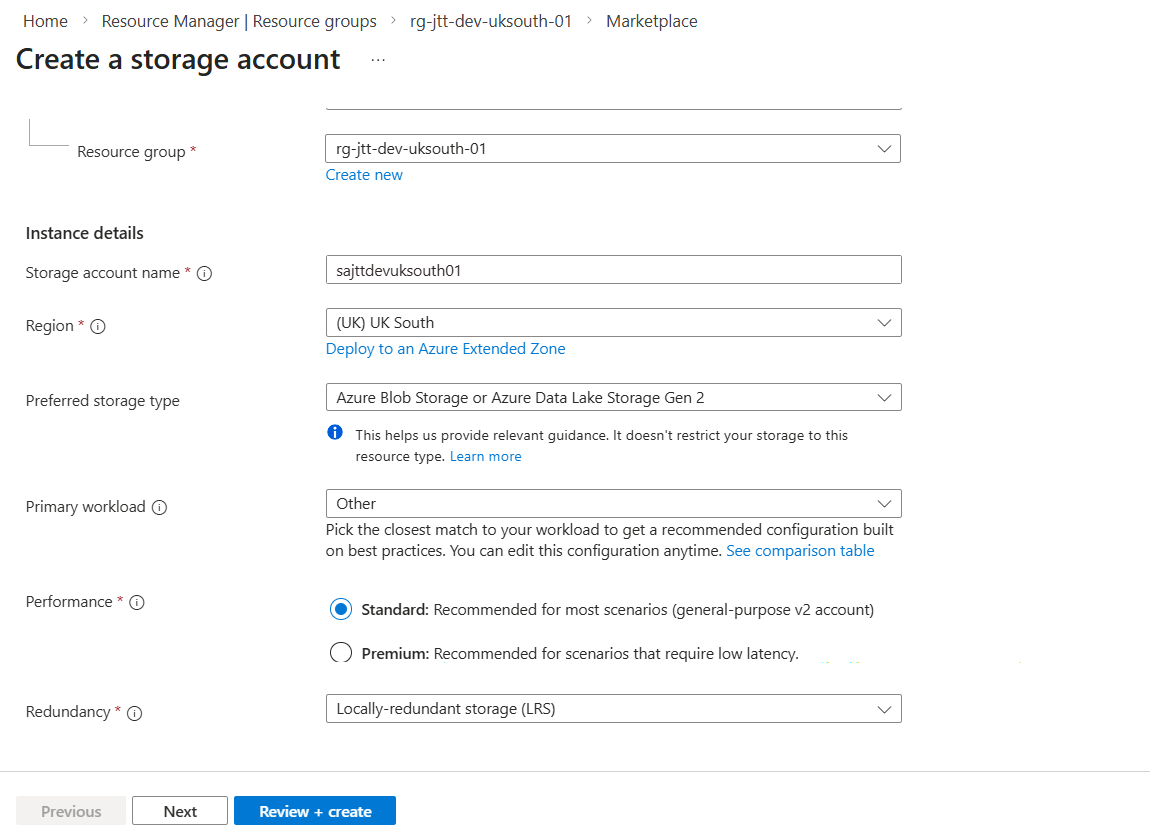
This dropdown has two options:
| Option | What it means |
|---|---|
| Azure Blob Storage or Azure Data Lake Storage Gen 2 | You primarily want to store blobs (files, images, backups, data lake) |
| Azure Files | You primarily want SMB/NFS file shares |
This is GUIDANCE only!
Notice the info text: "This helps us provide relevant guidance. It doesn't restrict your storage to this resource type."
Even if you select "Blob Storage", you can still create File Shares later! This just customizes the Portal experience.
What happens when you select each:
Preferred Storage Type: Azure Blob Storage
    └── Portal shows blob-focused options
    └── Suggests blob-related configurations
    └── You can STILL create file shares!

Preferred Storage Type: Azure Files
    └── Portal shows file share-focused options
    └── Suggests file-related configurations
    └── You can STILL create blob containers!
2️⃣ Primary Workload (Dropdown) - Only for PREMIUM
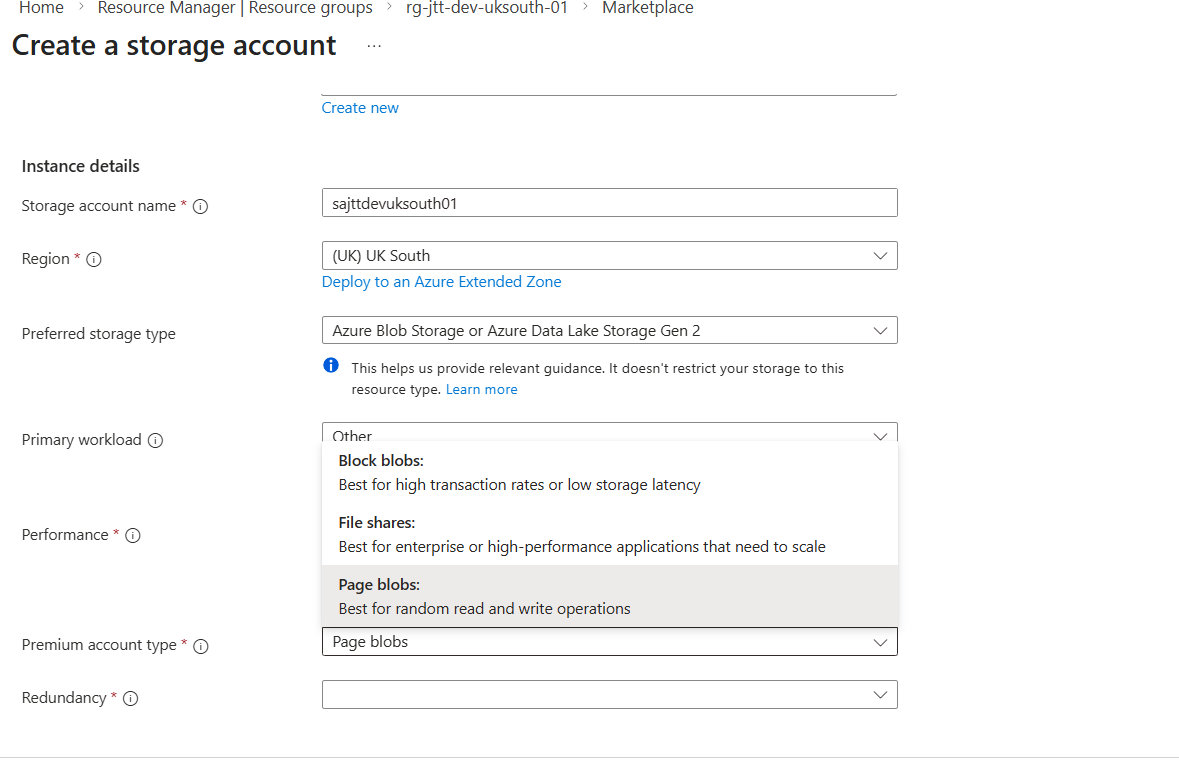
When you select Premium performance, this dropdown appears with three options:
| Option | Description | Use Case |
|---|---|---|
| Block blobs | "Best for high transaction rates or low storage latency" | AI/ML datasets, interactive apps, IoT data ingestion, media streaming |
| File shares | "Best for enterprise or high-performance applications that need to scale" | High-perf file shares, databases on file shares, NFS for Linux |
| Page blobs | "Best for random read and write operations" | Unmanaged VM disks (legacy), SAP HANA, random I/O workloads |
┌─────────────────────────────────────────────────────────────────────┐
│              PRIMARY WORKLOAD DECISION TREE                         │
├─────────────────────────────────────────────────────────────────────┤
│                                                                     │
│  What are you storing?                                              │
│         │                                                           │
│         ├── Files accessed via URL/API?                             │
│         │         │                                                 │
│         │         └── Need low latency? ──▶ BLOCK BLOBS (Premium)   │
│         │                                                           │
│         ├── SMB/NFS file shares?                                    │
│         │         │                                                 │
│         │         └── Need high IOPS? ──▶ FILE SHARES (Premium)     │
│         │                                                           │
│         └── VM disks (unmanaged)?                                   │
│                   │                                                 │
│                   └── Random I/O? ──▶ PAGE BLOBS (Premium)          │
│                                                                     │
└─────────────────────────────────────────────────────────────────────┘
Page Blobs are LEGACY
Microsoft recommends Managed Disks for VM disks now. Premium Page Blobs are mainly for:
- Legacy workloads that can't migrate
- Specialized scenarios like SAP HANA
- Custom VHD management
3️⃣ Performance (Radio Buttons)
| Performance | What You Get | Billing Model | Best For |
|---|---|---|---|
| Standard | HDD-backed, higher latency, all features | Consumption (pay for what you use) | 99% of workloads, cost-sensitive, backups |
| Premium | SSD-backed, consistent low latency, limited features | Provisioned (pay for reserved capacity) | Performance-critical, low latency needs |
STANDARD                              PREMIUM
┌────────────────────────┐           ┌────────────────────────┐
│  ✅ All redundancy     │           │  ❌ LRS/ZRS only       │
│     (LRS/ZRS/GRS/GZRS) │           │                        │
│                        │           │                        │
│  ✅ All access tiers   │           │  ❌ No tiers           │
│     (Hot/Cool/Cold/    │           │     (always "hot")     │
│      Archive)          │           │                        │
│                        │           │                        │
│  ✅ Lifecycle mgmt     │           │  ⚠️ Delete only        │
│     (auto-tiering)     │           │     (no tier changes)  │
│                        │           │                        │
│  💰 Pay for USED       │           │  💰 Pay for PROVISIONED│
│     capacity           │           │     capacity           │
│                        │           │                        │
│  📊 Variable latency   │           │  📊 Consistent latency │
│     (depends on load)  │           │     (SSD-backed)       │
└────────────────────────┘           └────────────────────────┘
4️⃣ Premium Account Type (Dropdown) - Only for PREMIUM
When Performance = Premium, you MUST select the account type:
| Premium Type | Creates | Storage Service | Max Size | Key Feature |
|---|---|---|---|---|
| Block blobs | BlockBlobStorage account | Blob only | 190.7 TiB per blob | High transaction rates |
| Page blobs | Storage account (Premium) | Page blobs only | 8 TiB per blob | Random I/O |
| File shares | FileStorage account | Files only | 100 TiB per share | NFS 4.1 support |
You CANNOT Change This Later!
Once you create a Premium storage account, you're locked into that type:
- Premium Block Blob account → Can only store block blobs
- Premium Page Blob account → Can only store page blobs
- Premium File Shares account → Can only have file shares
Standard accounts can do everything! (Blobs + Files + Queues + Tables)
5️⃣ Redundancy (Dropdown)
Options depend on Performance tier:
| Redundancy | Standard | Premium | Copies | Regions |
|---|---|---|---|---|
| LRS (Locally Redundant) | ✅ | ✅ | 3 copies | 1 datacenter |
| ZRS (Zone Redundant) | ✅ | ✅ | 3 copies | 3 zones in 1 region |
| GRS (Geo Redundant) | ✅ | ❌ | 6 copies | 2 regions |
| GZRS (Geo-Zone Redundant) | ✅ | ❌ | 6 copies | 3 zones + secondary region |
Complete Decision Matrix
┌─────────────────────────────────────────────────────────────────────┐
│                 WHICH OPTIONS SHOULD I PICK?                        │
├─────────────────────────────────────────────────────────────────────┤
│                                                                     │
│  SCENARIO                          RECOMMENDED SETTINGS             │
│  ────────────────────────────────  ─────────────────────────────    │
│                                                                     │
│  General file storage              Standard + Blob + LRS/ZRS        │
│  (images, docs, backups)                                            │
│                                                                     │
│  Data Lake / Analytics             Standard + Blob + LRS            │
│                                    (+ enable HNS at creation!)      │
│                                                                     │
│  File server replacement           Standard + Files + ZRS           │
│  (SMB shares)                                                       │
│                                                                     │
│  High-perf application data        Premium + Block blobs + ZRS      │
│  (low latency needed)                                               │
│                                                                     │
│  Linux NFS file shares             Premium + File shares + LRS      │
│  (NFS 4.1 protocol)                                                 │
│                                                                     │
│  VM disks (unmanaged)              Premium + Page blobs + LRS       │
│  ⚠️ Use Managed Disks instead!                                      │
│                                                                     │
│  Disaster recovery needed          Standard + GRS/GZRS              │
│  (cross-region protection)         ❌ Premium doesn't support!      │
│                                                                     │
└─────────────────────────────────────────────────────────────────────┘
Visual: What Each Selection Creates
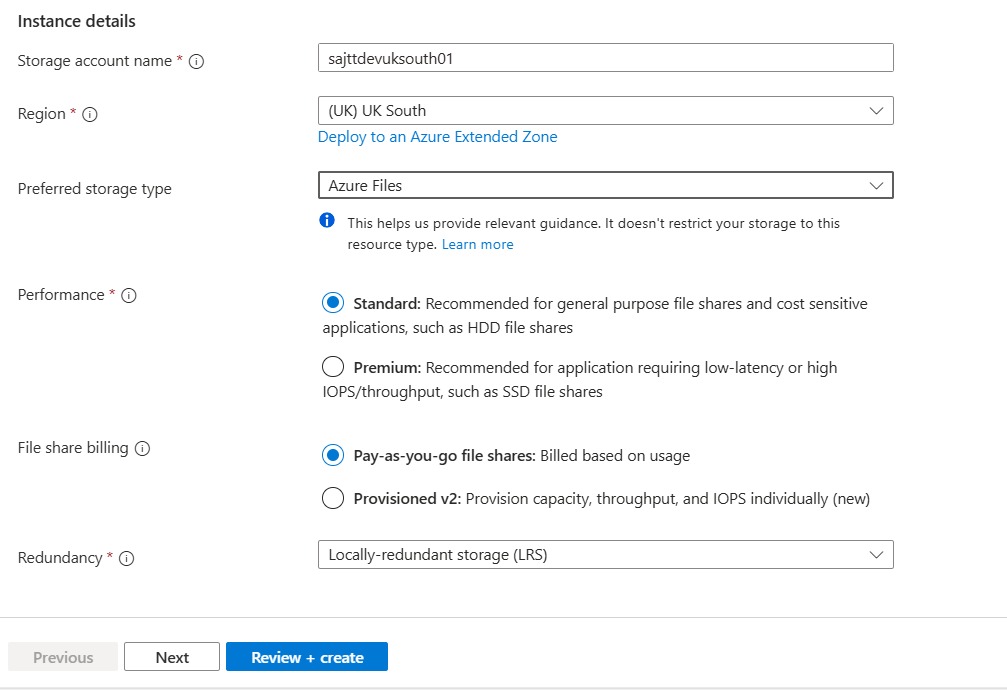
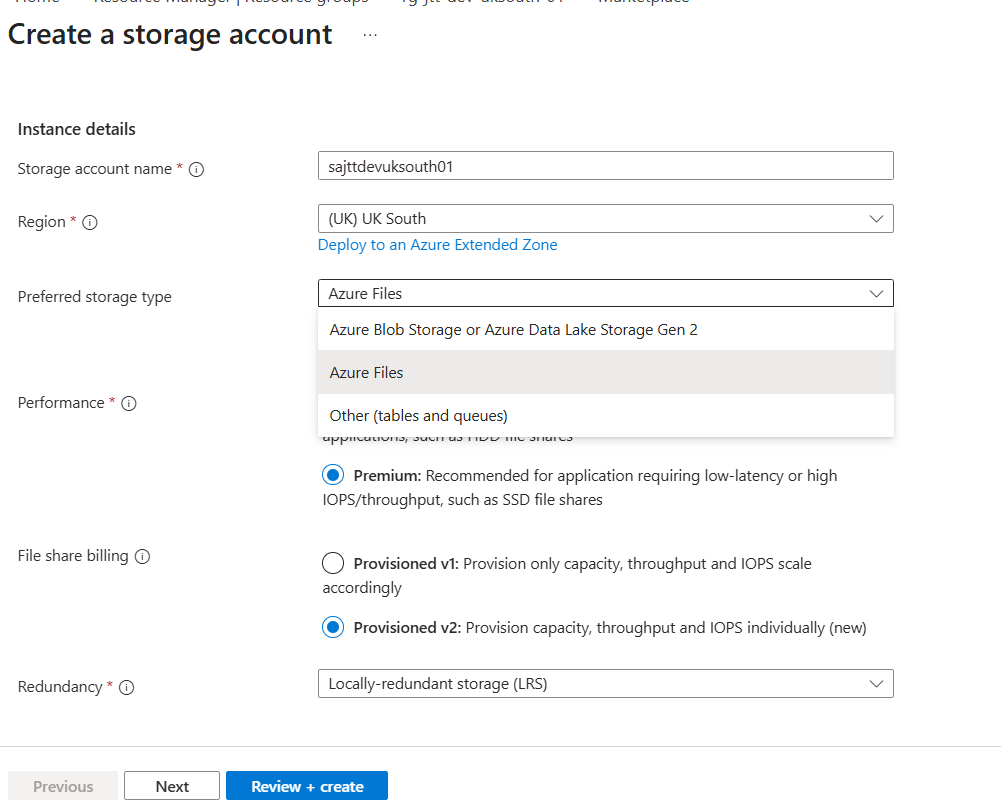
When you select Azure Files as preferred type:
| Setting | What Portal Shows |
|---|---|
| Preferred storage type | Azure Files |
| Performance: Standard | Creates StorageV2 account, SMB shares available |
| Performance: Premium | Shows "File shares" as Premium account type |
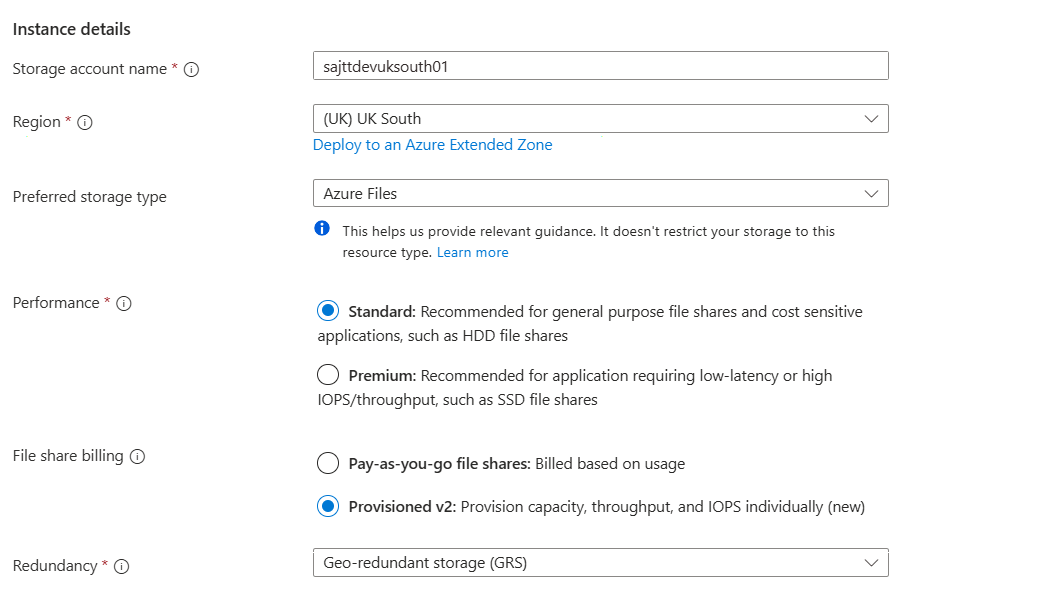
Premium File Shares Billing (Provisioned V1):
┌─────────────────────────────────────────────────────────────────────┐
│           PREMIUM FILES BILLING MODEL (Provisioned)                 │
├─────────────────────────────────────────────────────────────────────┤
│                                                                     │
│  You PROVISION a size:        100 GiB  ──▶  Pay for 100 GiB         │
│                               500 GiB  ──▶  Pay for 500 GiB         │
│                               1 TiB    ──▶  Pay for 1 TiB           │
│                                                                     │
│  But wait! Performance scales with size:                            │
│                                                                     │
│  ┌──────────────┬────────────┬──────────────┐                       │
│  │ Provisioned  │   IOPS     │  Throughput  │                       │
│  ├──────────────┼────────────┼──────────────┤                       │
│  │ 100 GiB      │   500      │   70 MiB/s   │                       │
│  │ 500 GiB      │   2,500    │   125 MiB/s  │                       │
│  │ 1 TiB        │   5,000    │   250 MiB/s  │                       │
│  │ 10 TiB       │   50,000   │   1,000 MiB/s│                       │
│  └──────────────┴────────────┴──────────────┘                       │
│                                                                     │
│  ⚠️ Need more IOPS? You must provision MORE CAPACITY!               │
│                                                                     │
│  Real example:                                                      │
│  - You store only 50 GiB of data                                    │
│  - But you need 5,000 IOPS                                          │
│  - You must provision 1 TiB and PAY for 1 TiB!                      │
│                                                                     │
└─────────────────────────────────────────────────────────────────────┘
New Option: Provisioned V2
There's now a Provisioned V2 model where you can set capacity, IOPS, and throughput independently (three separate dials). This avoids over-provisioning capacity just for IOPS!
Three Types of Blobs
| Type | Think of it as... | What it does | Use when |
|---|---|---|---|
| Block Blob | A normal file | Stores files in chunks (blocks) | 99% of cases - images, videos, documents, backups |
| Page Blob | A hard drive | Random read/write at 512-byte pages | VHDs for VMs (but use Managed Disks now!) |
| Append Blob | A log file | Only add to the end, never modify | Logs, audit trails, streaming data |
BLOCK BLOB                    PAGE BLOB                    APPEND BLOB
┌─────────────┐              ┌─────────────┐              ┌─────────────┐
│  Block 1    │              │ Page Page   │              │  Entry 1    │
│  Block 2    │              │ Page Page   │              │  Entry 2    │
│  Block 3    │              │ Page Page   │              │  Entry 3    │
│  Block 4    │              │ (random I/O)│              │  + new      │ ← Only here
└─────────────┘              └─────────────┘              └─────────────┘
  Upload in parts              Read/write anywhere          Append only
The Namespace Problem (CRITICAL!)
This is the most important concept to understand about blob storage.
Flat Namespace (Default)
What you SEE:                    What ACTUALLY exists:

folder/                          ❌ "folder" doesn't exist!
  └── subfolder/
        └── file.txt             The blob's NAME is literally:
                                 "folder/subfolder/file.txt"
The "/" is part of the blob's name! There are no real folders.
Why this matters:
- Rename folder? = Rename EVERY blob inside (copy + delete each one) = SLOW
- Move folder? = Copy ALL blobs to new "path", delete originals = SLOW
- Delete folder? = Delete EVERY blob individually = SLOW
Hierarchical Namespace (Data Lake)
What you SEE:                    What ACTUALLY exists:

folder/                          ✅ "folder" is a REAL directory object
  └── subfolder/                 ✅ "subfolder" is a REAL directory object
        └── file.txt             ✅ "file.txt" is inside it
Why this matters:
- Rename folder? = Change one metadata entry = INSTANT
- Move folder? = Change one pointer = INSTANT
- Delete folder? = Remove directory = FAST
Part 2: Azure Files - Network Shares
Azure Files = File shares in the cloud, accessible via SMB or NFS.
Mental Model
On-Premises                              Azure Files
┌─────────────────┐                     ┌─────────────────┐
│  File Server    │        →            │  Storage Account│
│  \\server\share │      Migrate        │  \\account.file.│
│                 │                     │  core.windows.  │
│  SMB shares     │                     │  net\share      │
└─────────────────┘                     └─────────────────┘
     Same experience, no server to manage!
Two Protocols
| Protocol | OS Support | Tier Required | Encryption in Transit | Access From |
|---|---|---|---|---|
| SMB | Windows, Linux, macOS | Standard or Premium | ✅ Yes (SMB 3.x) | Anywhere (internet!) |
| NFS 4.1 | Linux only | Premium only | ❌ No | VNet only (trusted) |
Authentication Methods (SMB only)
┌─────────────────────────────────────────────────────────────────────┐
│                     Who can access my share?                        │
├─────────────────────────────────────────────────────────────────────┤
│                                                                     │
│  1. STORAGE KEY        Shared password (avoid in production!)       │
│     ⚠️ Risky                                                        │
│                                                                     │
│  2. AD DS              Your on-prem Active Directory                │
│     ✅ Enterprise      (Kerberos via domain controller)             │
│                                                                     │
│  3. ENTRA ID           Cloud identity, hybrid joined devices        │
│     ✅ Modern          (Kerberos via Entra)                         │
│                                                                     │
│  4. ENTRA DS           Managed AD in Azure                          │
│     ✅ Cloud-only      (When you have no on-prem AD)                │
│                                                                     │
└─────────────────────────────────────────────────────────────────────┘
Part 3: Queue & Table (Legacy Services)
De-emphasized Services
Microsoft is not investing in these. They work, but use modern alternatives for new projects.
| Service | What it does | Modern Alternative |
|---|---|---|
| Queue | Pass messages between apps | Azure Service Bus |
| Table | Simple NoSQL key-value store | Cosmos DB Table API |
Part 4: Access Tiers - The Cost Optimization Layer
The Fundamental Trade-off
                    STORAGE COST                ACCESS COST
                    (per GB/month)              (per operation)
                         │                           │
    HOT         ████████████████████      ░░░░░░░░░░░░░░░░
                High storage cost          Low access cost
                         │                           │
    COOL        ████████████████          ░░░░░░░░░░░░░░░░░░
                Medium                     Medium
                         │                           │
    COLD        ████████████              ░░░░░░░░░░░░░░░░░░░░
                Lower                      Higher
                         │                           │
    ARCHIVE     ████                      ████████████████████████ + TIME!
                Cheapest storage           Expensive + wait hours
The Tier Decision Tree
How often do you access this data?
          │
          ▼
    ┌─────────────┐     Yes    ┌─────────┐
    │ Frequently? │───────────▶│   HOT   │
    └─────────────┘            └─────────┘
          │ No
          ▼
    ┌─────────────┐     Yes    ┌─────────┐
    │ Monthly?    │───────────▶│  COOL   │ (30 day minimum)
    └─────────────┘            └─────────┘
          │ No
          ▼
    ┌─────────────┐     Yes    ┌─────────┐
    │ Quarterly?  │───────────▶│  COLD   │ (90 day minimum)
    └─────────────┘            └─────────┘
          │ No
          ▼
    ┌─────────────┐     Yes    ┌─────────────┐
    │ Yearly/     │───────────▶│   ARCHIVE   │ (180 day minimum)
    │ Compliance? │            │   OFFLINE!  │
    └─────────────┘            └─────────────┘
Critical Archive Behavior
┌─────────────────────────────────────────────────────────────────────┐
│                    ⚠️ ARCHIVE IS OFFLINE ⚠️                         │
│                                                                     │
│   You CANNOT read archived data directly!                           │
│                                                                     │
│   To read: Archive ──▶ Rehydrate to Hot/Cool/Cold ──▶ Read         │
│                              │                                      │
│                              ▼                                      │
│                    Standard: up to 15 hours                         │
│                    High Priority: ~1 hour                           │
│                                                                     │
└─────────────────────────────────────────────────────────────────────┘
Blob Tiers vs File Share Tiers
BLOB TIERS                           FILE SHARE TIERS
(Set per individual blob)            (Set per entire share)

Container                            Share: Transaction Optimized
├── photo1.jpg [HOT]                 ├── file1.docx
├── photo2.jpg [COOL]                ├── file2.xlsx     All files in
├── backup.zip [COLD]                └── file3.pptx     share = same tier
└── archive.bak [ARCHIVE]
                                     (Cannot set per-file!)
Each blob = different tier!
Part 5: Data Lake Storage Gen2
Data Lake = Blob Storage + Hierarchical Namespace for big data analytics.
Why Data Lake?
Traditional Approach:                Data Lake Approach:

┌─────────┐   Transform    Store     ┌─────────┐   Store    Transform
│ Raw Data│──────────────▶ ❌        │ Raw Data│──────────▶──────────▶
└─────────┘   THEN store             └─────────┘   first!   when needed
              (lose original)                     (keep everything)

"I need that field I threw away!"    "Storage is cheap. Transform later."
The Data Lake Pattern
┌─────────────────────────────────────────────────────────────────────┐
│                        DATA LAKE                                    │
├─────────────────────────────────────────────────────────────────────┤
│                                                                     │
│  📥 INGEST          📦 RAW ZONE         ✨ CURATED        🎯 SERVE  │
│                                                                     │
│  CRM ────────┐      ┌──────────┐       ┌──────────┐    ┌─────────┐ │
│              │      │          │       │          │    │ Power   │ │
│  IoT ────────┼─────▶│ Store    │──────▶│ Clean    │───▶│ BI      │ │
│              │      │ as-is    │       │ Transform│    │ ML      │ │
│  Logs ───────┘      │          │       │          │    │ Reports │ │
│                     └──────────┘       └──────────┘    └─────────┘ │
│                      Keep forever       Process when                │
│                      (cheap!)           needed                      │
│                                                                     │
└─────────────────────────────────────────────────────────────────────┘
Part 6: Static Website Hosting
Host HTML/CSS/JS directly from blob storage - no web server needed!
How It Works
┌─────────────────────────────────────────────────────────────────────┐
│                        STORAGE ACCOUNT                              │
│                                                                     │
│   1. Enable "Static website"                                        │
│   2. Creates special container: $web                                │
│   3. Upload your HTML/CSS/JS                                        │
│   4. Get public URL                                                 │
│                                                                     │
│   $web/                                                             │
│   ├── index.html      ← Default page                               │
│   ├── 404.html        ← Error page                                 │
│   ├── styles.css                                                    │
│   └── script.js                                                     │
│                                                                     │
│   URL: https://accountname.z13.web.core.windows.net                │
│                                                                     │
└─────────────────────────────────────────────────────────────────────┘
📋 CRITICAL: Feature Compatibility Matrix
What You CANNOT Do Together
These features conflict - choosing one disables others. Know this for exams!
Hierarchical Namespace (HNS) Compatibility
When you enable Hierarchical Namespace (Data Lake Gen2), these features are affected:
| Feature | Without HNS | With HNS (Data Lake) |
|---|---|---|
| Blob Versioning | ✅ Available | ❌ NOT Available |
| Blob Snapshots | ✅ Full support | ⚠️ Limited |
| Blob Index Tags | ✅ Available | ❌ NOT Available |
| Change Feed | ✅ Available | ✅ Available |
| Point-in-time Restore | ✅ Available | ❌ NOT Available |
| Object Replication | ✅ Available | ❌ NOT Available |
| Soft Delete (Blob) | ✅ Available | ✅ Available |
| Soft Delete (Container) | ✅ Available | ✅ Available |
| NFS 3.0 Protocol | ❌ Not Available | ✅ Available |
| SFTP Protocol | ❌ Not Available | ✅ Available |
| POSIX ACLs | ❌ Not Available | ✅ Available |
| True Directories | ❌ Virtual only | ✅ Real directories |
Premium Performance Compatibility
| Feature | Standard | Premium Block Blob | Premium Page Blob | Premium Files |
|---|---|---|---|---|
| Access Tiers | ✅ Hot/Cool/Cold/Archive | ❌ No tiers | ❌ No tiers | ❌ No tiers |
| Lifecycle Management (Tiering) | ✅ Yes | ❌ Delete only | ❌ Delete only | ❌ Not available |
| GRS/GZRS Redundancy | ✅ Yes | ❌ LRS/ZRS only | ❌ LRS/ZRS only | ❌ LRS/ZRS only |
| Blob Versioning | ✅ Yes | ✅ Yes | ❌ No | N/A |
| NFS 4.1 (Files) | ❌ No | N/A | N/A | ✅ Yes |
Blob Type Compatibility
| Feature | Block Blob | Page Blob | Append Blob |
|---|---|---|---|
| Access Tiers | ✅ Hot/Cool/Cold/Archive | ❌ No tiers | ❌ No tiers |
| Versioning | ✅ Yes | ❌ No | ❌ No |
| Snapshots | ✅ Yes | ✅ Yes | ❌ No |
| Lifecycle Tiering | ✅ Yes | ❌ Delete only | ❌ Delete only |
| Max Size | 190.7 TiB | 8 TiB | 195 GiB |
Soft Delete & Versioning Interaction
┌─────────────────────────────────────────────────────────────────────┐
│                   PROTECTION OPTIONS                                │
├─────────────────────────────────────────────────────────────────────┤
│                                                                     │
│   SOFT DELETE              VERSIONING              POINT-IN-TIME    │
│   (Recovers deleted)       (Keeps all versions)   (Full restore)   │
│                                                                     │
│   Delete blob ──▶          Edit blob ──▶          Restore entire   │
│   Still there for          Old version kept       container to     │
│   X days                   automatically          specific time    │
│                                                                     │
│   ✅ Works with HNS        ❌ NOT with HNS        ❌ NOT with HNS   │
│                                                                     │
└─────────────────────────────────────────────────────────────────────┘
🔧 Portal vs API: What You Can Do
Storage Account Creation
| Setting | Portal | CLI/PowerShell | REST API | ARM/Bicep |
|---|---|---|---|---|
| Enable HNS | ✅ Checkbox at creation | ✅ --enable-hierarchical-namespace | ✅ Yes | ✅ Yes |
| Change HNS later | ❌ Cannot change | ❌ Cannot change | ❌ Cannot change | ❌ Cannot change |
| Performance tier | ✅ Radio button | ✅ --sku Premium_LRS | ✅ Yes | ✅ Yes |
| Change performance later | ❌ Cannot change | ❌ Cannot change | ❌ Cannot change | ❌ Cannot change |
| Redundancy | ✅ Dropdown | ✅ --sku Standard_GRS | ✅ Yes | ✅ Yes |
| Change redundancy later | ⚠️ Limited options | ⚠️ Limited options | ⚠️ Limited options | ⚠️ Limited options |
Blob Operations
| Operation | Portal | CLI | REST API | SDK |
|---|---|---|---|---|
| Upload blob | ✅ Drag & drop | ✅ az storage blob upload | ✅ PUT Blob | ✅ Yes |
| Set tier on upload | ✅ Dropdown | ✅ --tier Cool | ✅ x-ms-access-tier header | ✅ Yes |
| Change tier later | ✅ Right-click > Change tier | ✅ az storage blob set-tier | ✅ Set Blob Tier | ✅ Yes |
| Batch tier change | ❌ One at a time | ✅ Loop/batch | ✅ Batch API | ✅ Yes |
| Copy blob cross-account | ⚠️ Download/Upload | ✅ az storage blob copy | ✅ Copy Blob | ✅ Yes |
| Copy blob cross-region | ⚠️ Manual | ✅ Yes | ✅ Yes | ✅ Yes |
| Move blob (same account) | ❌ Copy + Delete | ❌ Copy + Delete | ❌ Copy + Delete | ❌ Copy + Delete |
| Move blob (HNS enabled) | ✅ True move | ✅ az storage fs file move | ✅ DFS API | ✅ Yes |
| Rename blob | ❌ Copy + Delete | ❌ Copy + Delete | ❌ Copy + Delete | ❌ Copy + Delete |
| Rename blob (HNS) | ✅ Instant | ✅ Instant | ✅ Instant | ✅ Instant |
Container Operations
| Operation | Portal | CLI | REST API |
|---|---|---|---|
| Create container | ✅ + Container button | ✅ az storage container create | ✅ PUT Container |
| Delete container | ✅ Delete button | ✅ az storage container delete | ✅ DELETE Container |
| Set access level | ✅ Change access level | ✅ --public-access blob/container | ✅ Set Container ACL |
| List blobs | ✅ Browse in portal | ✅ az storage blob list | ✅ List Blobs |
| Move container | ❌ NOT POSSIBLE | ❌ NOT POSSIBLE | ❌ NOT POSSIBLE |
| Rename container | ❌ NOT POSSIBLE | ❌ NOT POSSIBLE | ❌ NOT POSSIBLE |
| Copy container | ❌ Copy blobs individually | ✅ Script with azcopy | ✅ Copy each blob |
You Cannot Move or Rename Containers!
There is no move or rename operation for containers. You must:
- Create new container with desired name
- Copy all blobs to new container
- Delete old container
Tier Change Operations
| From → To | Time | Method | Cost Impact |
|---|---|---|---|
| Hot → Cool | Instant | Portal/CLI/API | Write charge to Cool |
| Hot → Cold | Instant | Portal/CLI/API | Write charge to Cold |
| Hot → Archive | Instant | Portal/CLI/API | Write charge to Archive |
| Cool → Hot | Instant | Portal/CLI/API | Read charge from Cool |
| Cool → Archive | Instant | Portal/CLI/API | Write charge to Archive |
| Archive → Hot | Up to 15 hours | Rehydrate | High priority extra cost |
| Archive → Cool | Up to 15 hours | Rehydrate | High priority extra cost |
| Archive → Cold | Up to 15 hours | Rehydrate | High priority extra cost |
What API Can Do That Portal Cannot
| Capability | Portal | API/CLI |
|---|---|---|
| Bulk operations (thousands of blobs) | ❌ One by one | ✅ Batch API, azcopy |
| Conditional operations (ETags) | ❌ No | ✅ If-Match headers |
| Lease blobs (lock for exclusive access) | ❌ Limited | ✅ Full control |
| Append to append blob | ❌ No | ✅ Append Block |
| Stage blocks before commit | ❌ No | ✅ Put Block + Put Block List |
| Set blob metadata in bulk | ❌ No | ✅ Yes |
| Automate with triggers | ❌ No | ✅ Event Grid, Functions |
Quick Reference Summary
Service Selection
What are you storing?
        │
        ├── Files to access via URL → BLOB
        │
        ├── File share for apps/users → FILES
        │
        ├── Messages between apps → SERVICE BUS (not Queue)
        │
        └── Key-value data → COSMOS DB (not Table)
Tier Selection
Access frequency?
        │
        ├── Daily/Hourly → HOT
        ├── Monthly → COOL (30 days min)
        ├── Quarterly → COLD (90 days min)
        └── Yearly/Compliance → ARCHIVE (180 days, OFFLINE!)
Namespace Decision
Need true directories, NFS, SFTP, or big data analytics?
        │
        ├── Yes → Hierarchical Namespace (Data Lake Gen2)
        │         ⚠️ But you LOSE: Versioning, Index Tags, Point-in-time
        │
        └── No → Flat Namespace (Standard)
                 ✅ All blob features available

⚠️ DECIDE AT CREATION - CANNOT CHANGE LATER!
🧪 Labs
See labs.md for hands-on exercises using Azure Portal!
Next Section
Continue to: 04-security-and-access-control.md (coming next)