
Stored Access Policies
Scott Duffy Lecture 11 AZ-104Overview
Stored access policies provide a mechanism for centralized SAS token management at the container level. Instead of issuing ad-hoc SAS tokens that cannot be modified or revoked after creation, you define a named policy on the container and then issue SAS tokens that reference that policy. Any change to the policy immediately affects every SAS token linked to it.
Key Insight
The core problem stored access policies solve is SAS token revocation. With ad-hoc SAS tokens, the only way to revoke access is to regenerate the storage account signing key, which invalidates all SAS tokens across the entire account. Stored access policies let you surgically revoke or modify access for a specific set of tokens without affecting anything else.
What Are Stored Access Policies?
A stored access policy is a named, server-side policy defined on a blob container (or queue, table, or file share) that contains the same fields you would normally embed directly into a SAS token:
- Permissions -- read, write, delete, list, etc.
- Start time -- when the policy becomes active
- Expiry time -- when the policy (and all tokens referencing it) expires
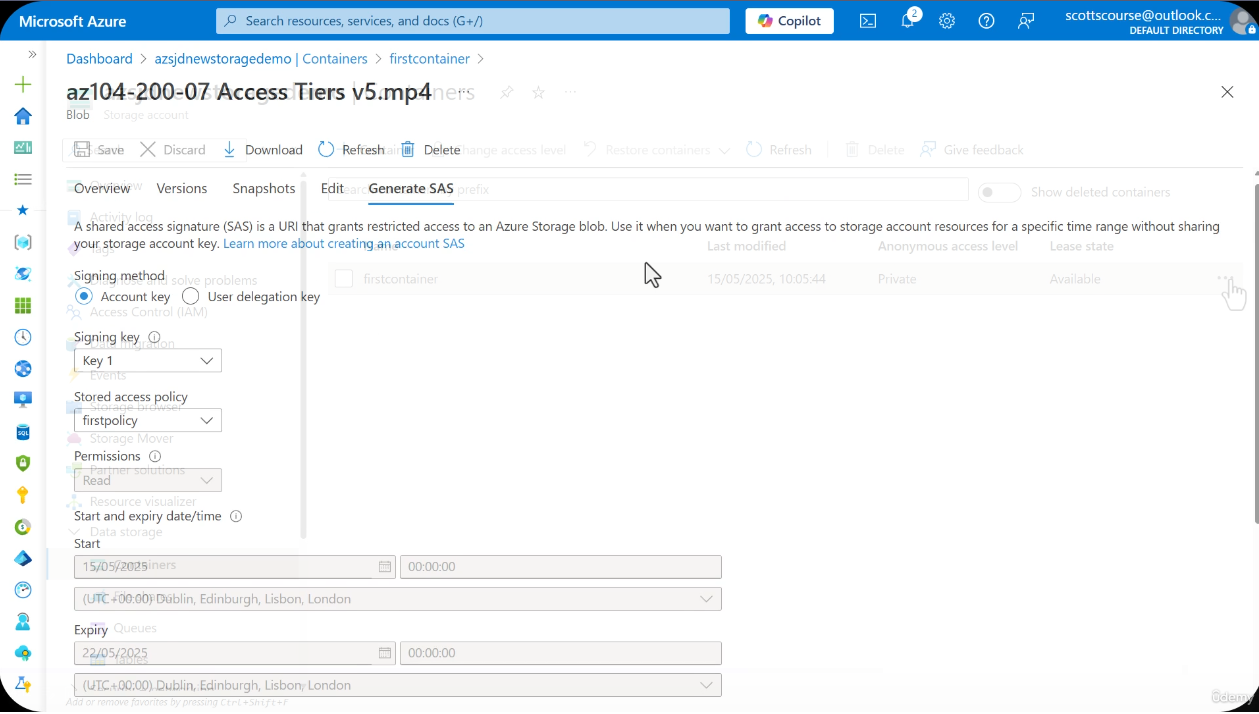
When you generate a SAS token, instead of baking permissions and expiry directly into the token URL, you reference the policy by name. The token itself contains only the policy name and signature; all access parameters are resolved server-side from the policy definition.
Hard Limit
A maximum of 5 stored access policies can exist on a single container at any given time. This is a hard limit enforced by Azure Storage.
Policy Structure
A stored access policy contains three core components that mirror the fields of an ad-hoc SAS token:
| Field | Description | Example |
|---|---|---|
| Name | Unique identifier for the policy (up to 64 characters) | readpolicy |
| Permissions | Combination of read, add, create, write, delete, list | rl (read + list) |
| Start time | When the policy becomes effective (optional) | 2025-01-01T00:00:00Z |
| Expiry time | When the policy expires | 2025-06-30T23:59:59Z |
The critical design feature is that multiple SAS tokens can reference the same policy. When you modify the policy, the change propagates immediately to every token using it.
Policy Lifecycle
Policy-to-Token Relationship
The relationship between a stored access policy and SAS tokens is one-to-many. A single policy governs the behavior of every token that references it.
direction: right

policy: Stored Access Policy {
  shape: rectangle
  style.fill: "#2563eb"
  style.font-color: "#fff"

  name: "readpolicy"
  permissions: "read, list"
  expiry: "2025-06-30"
}

token1: SAS Token 1\n(User A) {
  shape: rectangle
  style.fill: "#7c3aed"
  style.font-color: "#fff"
}

token2: SAS Token 2\n(User B) {
  shape: rectangle
  style.fill: "#7c3aed"
  style.font-color: "#fff"
}

token3: SAS Token 3\n(Application C) {
  shape: rectangle
  style.fill: "#7c3aed"
  style.font-color: "#fff"
}

token4: SAS Token 4\n(Partner D) {
  shape: rectangle
  style.fill: "#7c3aed"
  style.font-color: "#fff"
}

policy -> token1: references
policy -> token2: references
policy -> token3: references
policy -> token4: references
Policy Management
Creating a Policy
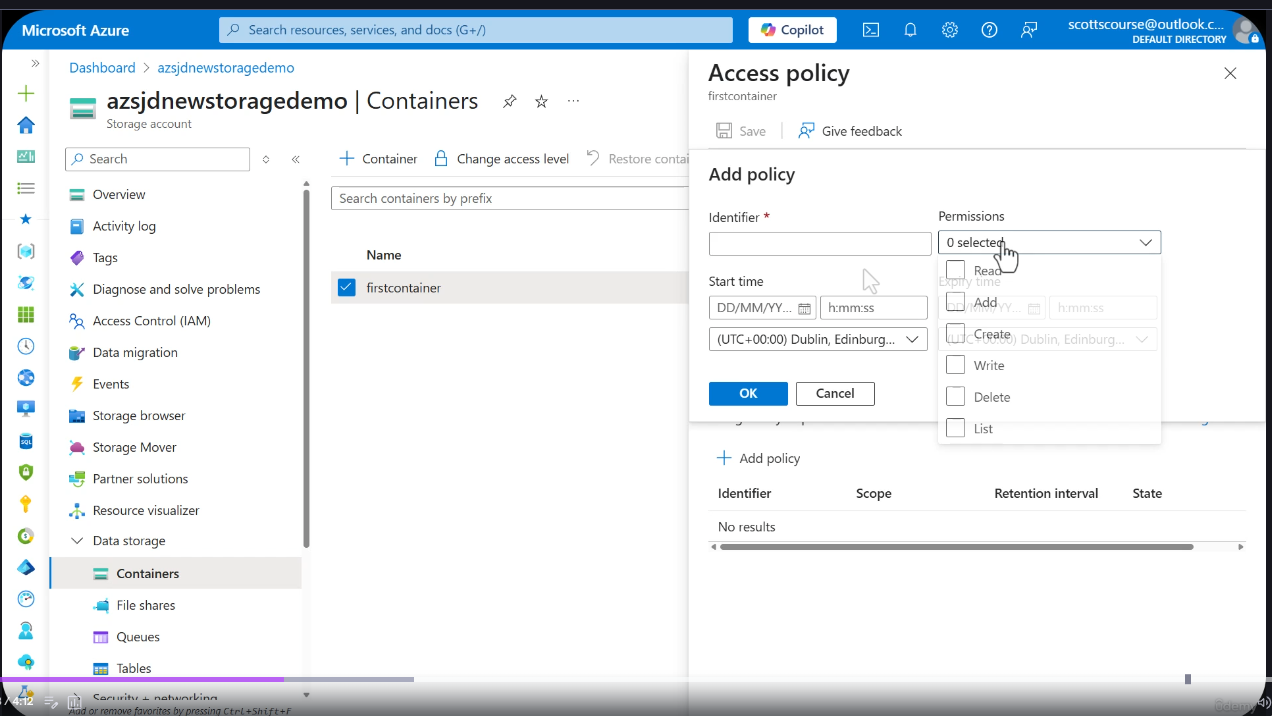
Assign a unique name, set the desired permissions, and define the time window. The policy is created at the container level and immediately becomes available for SAS token generation.
Modifying a Policy
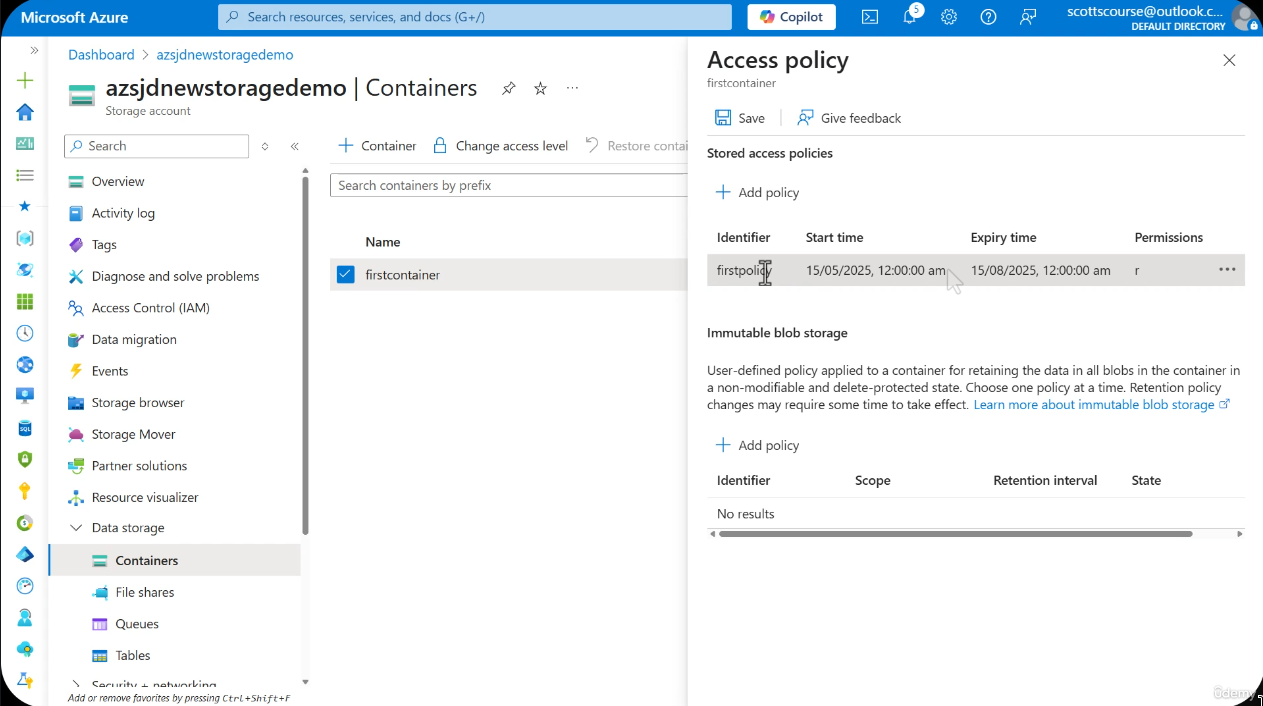
You can edit the start time, expiry date, and permissions of an existing policy at any time. The effect is immediate -- every SAS token referencing the policy is affected without any action from the token holders.
Revoking Access
To revoke access for all tokens using a policy, set the expiry time to 30 minutes in the past. This immediately invalidates every SAS token referencing the policy. There is no need to contact individual users or regenerate storage account keys.
Revocation Pattern
Setting the policy expiry to 30 minutes ago is the standard revocation pattern. This accounts for clock skew and ensures all tokens are definitively expired. You do not need to contact users or regenerate keys.
Deleting a Policy
Deleting a stored access policy entirely will also invalidate all SAS tokens that reference it. This is a more permanent action than modifying the expiry.
Screenshots
Container Access Policy Management
SAS Signing Method
Container Overview
Ad-Hoc SAS vs Policy-Based SAS
| Feature | Ad-Hoc SAS | Policy-Based SAS |
|---|---|---|
| Revocation | Regenerate signing key (breaks ALL SAS) | Modify/delete policy (surgical) |
| Modification | Cannot modify after creation | Can change permissions, expiry anytime |
| Tracking | No name, no tracking | Named, manageable |
| Max per container | Unlimited | 5 stored access policies |
| Best for | One-time, short-lived access | Long-lived, multi-user access |
Common Policy Patterns
Read-Only Policy
Grant read and list permissions with a defined expiry. Ideal for external consumers who need to download blobs but should never modify them.
Write-Only Policy
Grant write and create permissions without read. Useful for ingestion pipelines where clients push data but should not be able to read other data in the container.
Full-Access Policy with Time Limits
Grant all permissions but with a strict expiry window. Suitable for administrative tasks or migration operations that need broad access for a limited time.
Use Cases
- Long-lived policies (6 months or more) where requirements may change over the lifetime of the policy
- Multiple users or applications that need the same access grant and should be managed uniformly
- Flexible permission management without regenerating tokens -- extend access for users who need continued access, or shorten it during security incidents
- Audit and tracking through named policies that provide visibility into what access has been granted
Benefits Over Ad-Hoc SAS
- Centralized control -- one policy governs many tokens
- Modifiable without breaking existing tokens -- or selectively breaking them when needed
- Can extend lifetime for users who need continued access beyond the original expiry
- Can shorten lifetime in response to security incidents or policy changes
- Reusable across multiple token issuances over time
Best Practices
Recommendations
- Use stored access policies when granting access to multiple parties who need the same permissions
- Ideal for 6-month or longer policies that may need adjustment during their lifetime
- Reserve ad-hoc SAS for short-lived, one-time access needs where revocation is not a concern
- Keep track of the 5-policy-per-container limit and plan your policy naming strategy accordingly
CLI Commands
# Create stored access policy
az storage container policy create \
  --container-name mycontainer \
  --account-name myaccount \
  --name readpolicy \
  --permissions rl \
  --expiry 2025-06-30T23:59:59Z

# List policies
az storage container policy list \
  --container-name mycontainer \
  --account-name myaccount \
  --output table

# Generate SAS using policy
az storage blob generate-sas \
  --account-name myaccount \
  --container-name mycontainer \
  --name myblob.txt \
  --policy-name readpolicy

# Update policy (change expiry)
az storage container policy update \
  --container-name mycontainer \
  --account-name myaccount \
  --name readpolicy \
  --expiry 2025-01-01T00:00:00Z

# Delete policy (revoke all tokens using it)
az storage container policy delete \
  --container-name mycontainer \
  --account-name myaccount \
--name readpolicy# Create stored access policy
$ctx = New-AzStorageContext -StorageAccountName "myaccount" -StorageAccountKey "<key>"
New-AzStorageContainerStoredAccessPolicy `
-Container "mycontainer" `
-Context $ctx `
-Policy "readpolicy" `
-Permission "rl" `
-ExpiryTime (Get-Date).AddMonths(6)
# List policies
Get-AzStorageContainerStoredAccessPolicy `
-Container "mycontainer" `
-Context $ctx
# Generate SAS using policy
New-AzStorageBlobSASToken `
-Container "mycontainer" `
-Blob "myblob.txt" `
-Context $ctx `
-Policy "readpolicy"
# Update policy (change expiry)
Set-AzStorageContainerStoredAccessPolicy `
-Container "mycontainer" `
-Context $ctx `
-Policy "readpolicy" `
-ExpiryTime (Get-Date).AddMinutes(-30)
# Delete policy (revoke all tokens using it)
Remove-AzStorageContainerStoredAccessPolicy `
-Container "mycontainer" `
-Context $ctx `
-Policy "readpolicy"Lab: Stored Access Policy Lifecycle
Step 1 -- Create a stored access policy named "readonly" with read+list permissions and 7-day expiry
# Set variables
ACCOUNT_NAME="<your-storage-account>"
CONTAINER_NAME="labcontainer"
POLICY_NAME="readonly"
EXPIRY=$(date -u -d "+7 days" '+%Y-%m-%dT%H:%M:%SZ')

# Create the container if it does not exist
az storage container create \
  --name $CONTAINER_NAME \
  --account-name $ACCOUNT_NAME

# Upload a test blob
echo "Hello from stored access policy lab" > /tmp/testblob.txt
az storage blob upload \
  --account-name $ACCOUNT_NAME \
  --container-name $CONTAINER_NAME \
  --name testblob.txt \
  --file /tmp/testblob.txt

# Create the stored access policy
az storage container policy create \
  --container-name $CONTAINER_NAME \
  --account-name $ACCOUNT_NAME \
  --name $POLICY_NAME \
  --permissions rl \
  --expiry $EXPIRY

# Verify the policy was created
az storage container policy list \
  --container-name $CONTAINER_NAME \
  --account-name $ACCOUNT_NAME \
  --output table
Step 2 -- Generate a SAS token using the policy
# Generate SAS token referencing the policy
SAS_TOKEN=$(az storage blob generate-sas \
  --account-name $ACCOUNT_NAME \
  --container-name $CONTAINER_NAME \
  --name testblob.txt \
  --policy-name $POLICY_NAME \
  --output tsv)

# Construct the full URL
BLOB_URL="https://${ACCOUNT_NAME}.blob.core.windows.net/${CONTAINER_NAME}/testblob.txt?${SAS_TOKEN}"

echo "SAS URL: $BLOB_URL"
Step 3 -- Test the SAS URL (should work for reading)
# Download the blob using the SAS URL
curl -s "$BLOB_URL"
# Expected output: Hello from stored access policy lab
The request should succeed and return the blob content because the "readonly" policy grants read and list permissions and the expiry is 7 days in the future.
Step 4 -- Update the policy to set expiry to 30 minutes ago
# Set expiry to 30 minutes in the past to revoke access
REVOKE_TIME=$(date -u -d "-30 minutes" '+%Y-%m-%dT%H:%M:%SZ')

az storage container policy update \
  --container-name $CONTAINER_NAME \
  --account-name $ACCOUNT_NAME \
  --name $POLICY_NAME \
  --expiry $REVOKE_TIME

echo "Policy expiry set to: $REVOKE_TIME (30 minutes ago)"
Step 5 -- Test the SAS URL again (should be denied)
# Attempt to download the blob using the same SAS URL
curl -s "$BLOB_URL"
# Expected: AuthenticationFailed error -- the policy has expired
The request should now fail with an authentication error. The SAS token itself has not changed, but the underlying policy expiry is in the past, so Azure Storage rejects the request.
Step 6 -- Delete the policy and create a new one with different permissions
# Delete the expired policy
az storage container policy delete \
  --container-name $CONTAINER_NAME \
  --account-name $ACCOUNT_NAME \
  --name $POLICY_NAME

# Create a new policy with write permissions
NEW_EXPIRY=$(date -u -d "+30 days" '+%Y-%m-%dT%H:%M:%SZ')

az storage container policy create \
  --container-name $CONTAINER_NAME \
  --account-name $ACCOUNT_NAME \
  --name "writeaccess" \
  --permissions rwl \
  --expiry $NEW_EXPIRY

# Verify the new policy
az storage container policy list \
  --container-name $CONTAINER_NAME \
  --account-name $ACCOUNT_NAME \
  --output table

# Clean up
az storage container delete \
  --name $CONTAINER_NAME \
  --account-name $ACCOUNT_NAME